
INFOR BIRST BUDGET VS ACTUAL · FEATURED REPORT · NOVEMBER
Budget Watch
Department managers track their own budgets — without contacting Finance. In one hands-on week, your team builds Budget Watch, a budget vs actual report for every manager, from the delivered Birst Global Ledger Income Statement, with its drill-downs to account and transaction detail already in place.
HANDS-ON PRIVATE WORKSHOP
$7,500
Fixed price · up to 6 people · one week of guided implementation · 30 days of the ECS Reporting Advantage included
SEE IT IN 60 SECONDS
Budget Watch, start to finish
The delivered report, Budget Watch, the drill to the transactions, and how your team builds and owns it. Real reports, ECS demo data. Captions are on.
Before and after
REAL REPORTS · ECS DEMO DATA
BEFORE · THE DELIVERED INCOME STATEMENT
Actuals and last year, every department combined
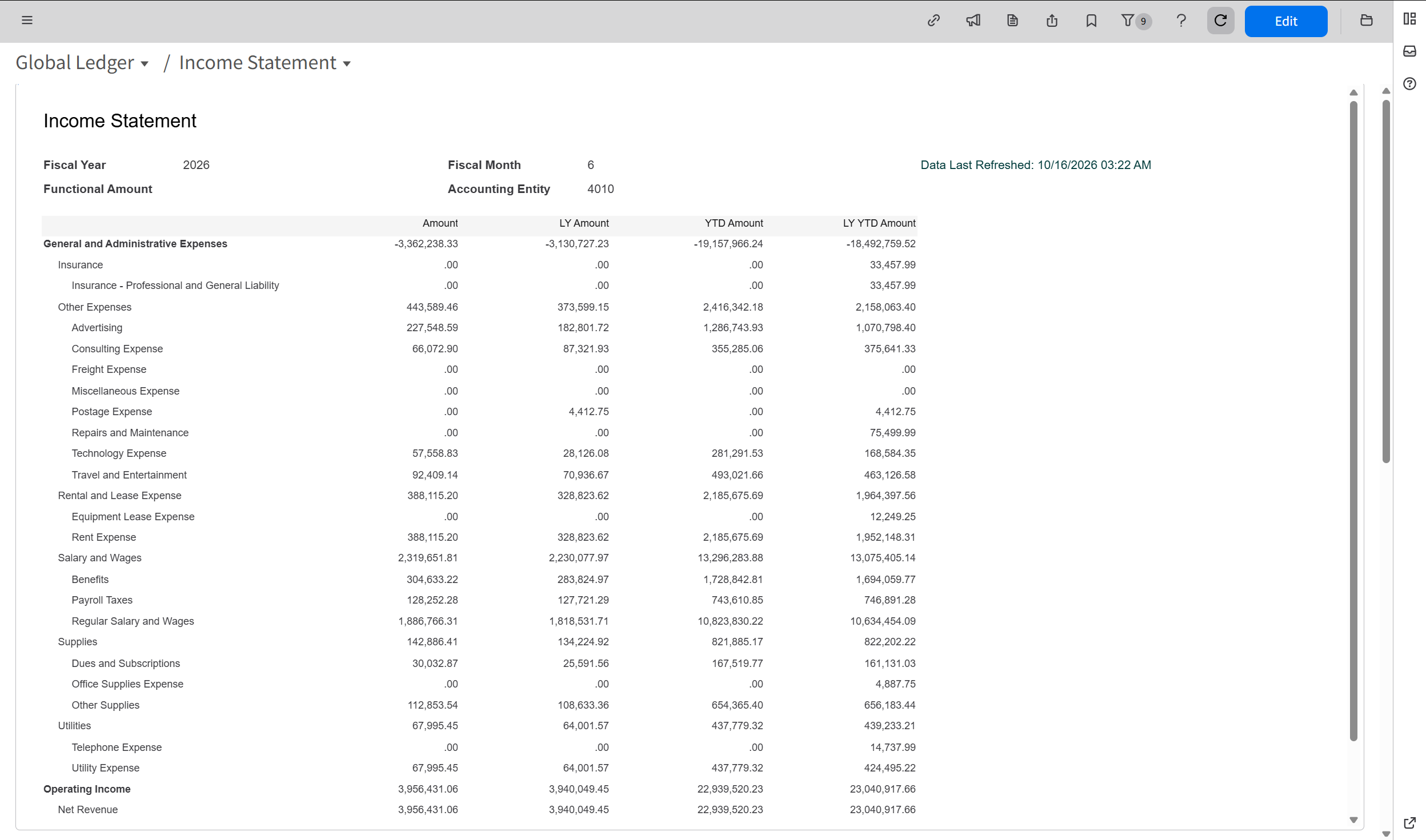
Built for Finance: actuals against last year, with no budget, no variance and no flags. A department manager can't tell where they stand, so they ask Finance.
AFTER · BUDGET WATCH
Expense accounts, month and year to date, flagged
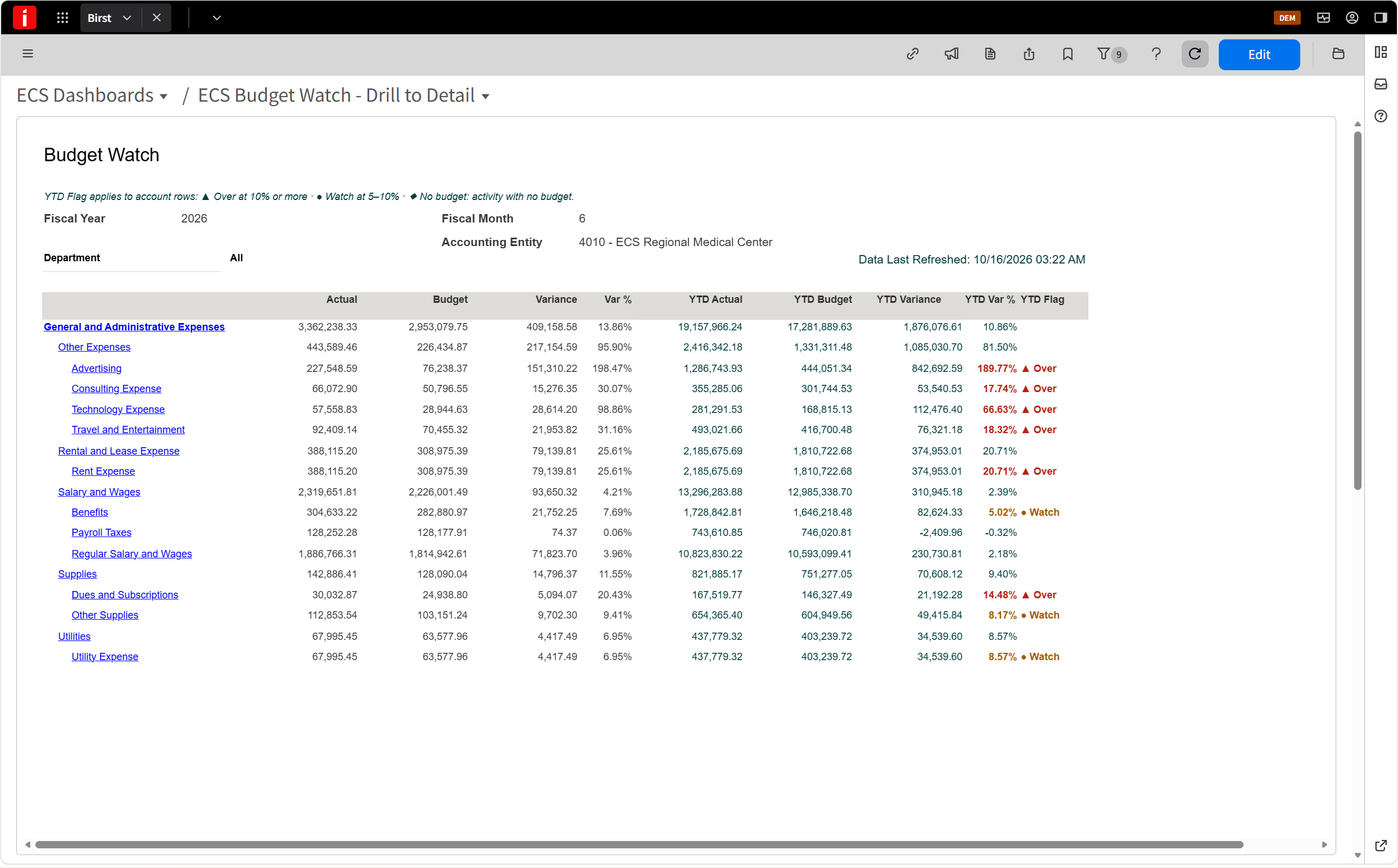
▲ Over at 10% or more · ● Watch at 5–10% · ◆ Activity with no budget. Variance is actual minus budget, so overspending shows as a positive number.
CLICK ANY ACCOUNT TO SEE WHY
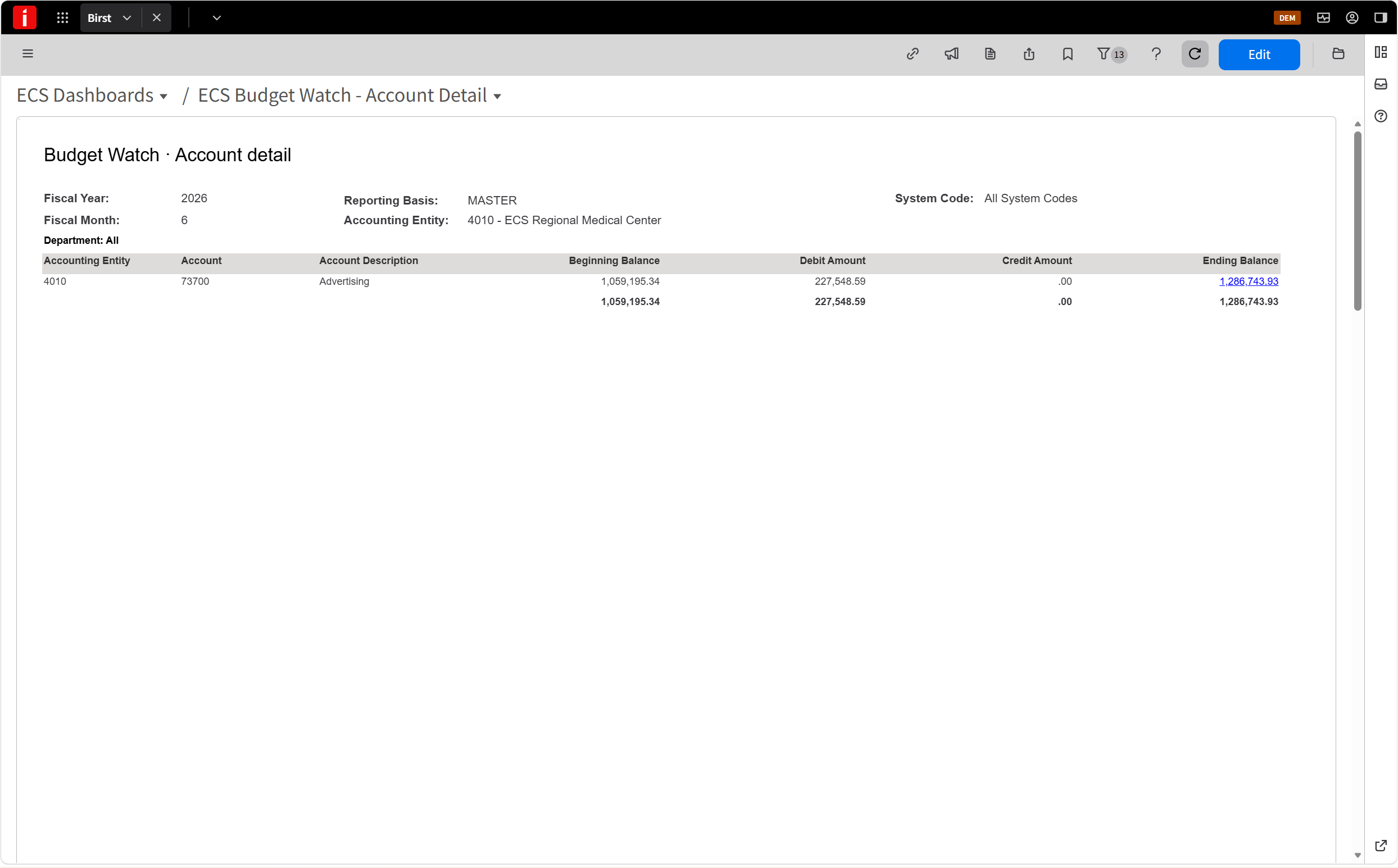
Account detail. Advertising's balance for the period: beginning, debits, credits, ending.
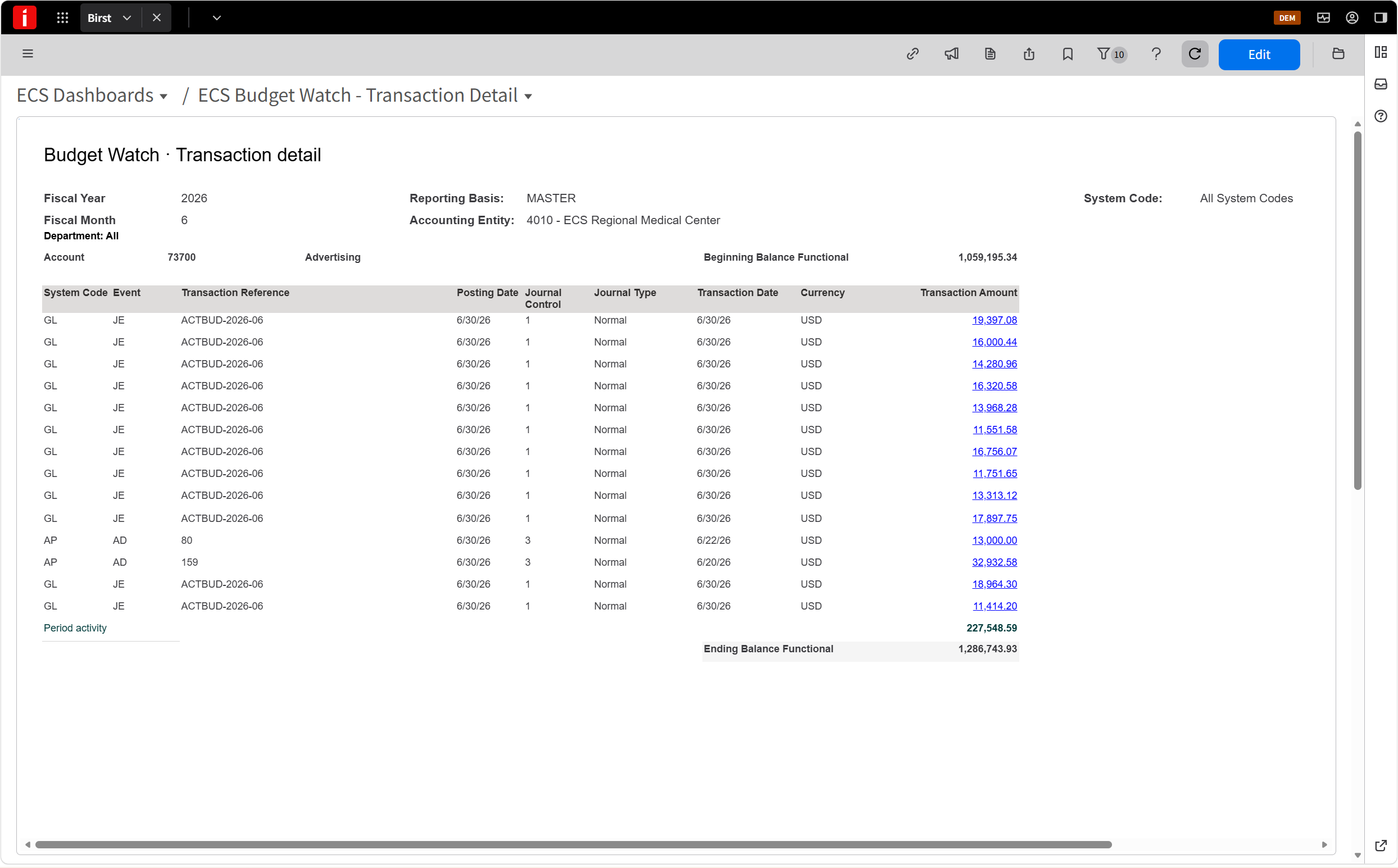
Transaction detail. Every journal and invoice behind the spending. Click any line for the source document.
DESCRIPTION
Budget Watch starts from the delivered Birst Global Ledger Income Statement, which already drills down to account and transaction detail. It is built for Finance: every account, company-wide.
In the workshop, your team builds Budget Watch from it: a view each department manager can use: one company and one budget scenario, with expense accounts as rows, a department filter, monthly and year-to-date columns side by side, and overruns flagged against your thresholds.
WHY IT MATTERS
When managers can't see their own budget, they ask Finance — "where am I against budget?" — again and again.
Finance spends days each month answering those questions and building variance spreadsheets, and overruns still come to light at quarter-end.
FEATURES
- Overruns flagged — ▲ Over at 10% or more, ● Watch at 5–10%, ◆ activity with no budget; you set the thresholds
- Month and year to date — actual, budget, variance (actual minus budget) and variance %, side by side
- Drill-down — from any account to its balance, then to every transaction behind it
- A department filter — each manager picks their own department
- Tied to your ledger — checked against Analyze Budget before go-live
BENEFITS
- Managers serve themselves. They check their own budget any time instead of calling Finance.
- Finance gets time back. Fewer questions, and no monthly variance spreadsheet.
- Act sooner. Overruns are caught monthly, while there's time to fix them.
- Trusted numbers. The view ties to your ledger, so the conversation is about the spending, not the report.
What you get for $7,500
01
Your team builds it
Your team makes every change in your own Birst test space, guided step by step — so you can adjust it, and the next report, without us. We show you the finished version in our demo system first, so everyone knows what they are building.
02
Mini-course for your team
Short on-demand lessons on reading and adapting Budget Watch. Access opens when you book, for everyone in the workshop.
03
Three live sessions
Intro call, 90-minute working session and wrap-up — all in week one, private to your team, and led by an ECS associate or a partner consultant working with ECS. ECS sets the learning plan and checks the result.
04
30 days of the ECS Reporting Advantage
Three weekly 30-minute results checks after the workshop week: we measure progress against your goal and help with anything blocking your team. It ends with your first Value Scorecard, an assessment of one next opportunity, a 30-minute executive briefing and a tailored 90-day plan.
05
Your ECS dashboard
Your goal and its measured result, each results check, and the opportunities beyond this workshop's scope that we think would help next.
06
Assessment
A 10-minute questionnaire and your intro call: we confirm readiness and set your goal, its starting number and what will change.
07
Tie-out and handover check
Proof that Budget Watch agrees with your ledger, and a clear Ready or Not ready.
08
Owner instructions
How to run, review and adjust Budget Watch each month — so it keeps working after we leave.
Your week
One week of guided implementation — about 4 hours of your team's time when the readiness checks below are in place. Your team, or your partner, makes the changes in your tenant; we work alongside you at every step.
MONDAY · GET READY
Intro call · 30 min
- Before the call: a 10-minute online questionnaire about your reporting
- Confirm readiness
- Pick the company, the budget scenario and the expense accounts in scope
- Agree thresholds and department owners
- We demo the finished Budget Watch and share the build guide
- Team starts the mini-course
TUESDAY–WEDNESDAY · BUILD
Working session · 90 min
- Set your thresholds
- Map departments and owners
- Adapt the views to your chart of accounts
- Your team drives; we guide
THURSDAY · PROVE
Tie-out · on your schedule
- Your team ties one closed period to Analyze Budget
- We review it and flag any gaps
FRIDAY · GO LIVE
Wrap-up · 30 min
- Handover check: Ready or Not ready, verified by ECS
- You approve, and your administrator moves Budget Watch into production
- Owner instructions finalized
- We set your goal and its starting number on your ECS dashboard
THEN · 30 DAYS OF THE ECS REPORTING ADVANTAGE, INCLUDED
See how ECS Reporting Advantage works, on your own reporting
- A 30-minute check-in each week for the three weeks after the workshop week — are managers using it, are the thresholds right, what's in the way?
- Progress on your ECS dashboard each week — your goal, the number, bottlenecks cleared, and opportunities beyond this workshop's scope.
- In the final week: your first Value Scorecard, an assessment of one next opportunity from your dashboard, a 30-minute executive briefing and a tailored 90-day plan.
The 30 days are part of the workshop price, and they never roll into a subscription on its own. Your team owns what it builds. If the 30 days are useful, we recommend continuing with ECS Reporting Advantage: each month we find the next improvement, define it, verify it worked, and show you the evidence. How ECS Reporting Advantage works →
READINESS
2-minute check: is your team ready?
- ✓ Birst is in use, with the delivered Global Ledger Income Statement available
- ✓ A budget scenario is loaded for this fiscal year
- ✓ Someone on your team, or a partner working with you, can edit Birst content in a test space
- ✓ Department managers have Birst access — or you have a plan to give it to them
Missing one? Book a free Private Reporting Review and we'll tell you what it takes.
BEFORE MANAGERS CAN USE IT
Let each manager see only their department
To share Budget Watch with department managers, each one needs Birst access and data security that limits them to their own department.
If your security is already set up, we'll show your team how to share the dashboard. If not, your Infor partner — or one of our partners — can set it up alongside the workshop, quoted separately.
Want more changes?
Revenue as well as expense, a different layout, more scenarios — tell us what you need and we'll send a fixed quote.
After the 30 days
Keep your expert and your ECS dashboard. With ECS Reporting Advantage, each month we find the next reporting improvement, define it, verify it worked, and show you the evidence in your Value Scorecard.
Continue at $5,950 a month, month to month, with no minimum term. Nothing renews on its own: you decide on day 30.
BUDGET WATCH QUESTIONS
Can Infor Birst show budget vs actual by department?
Yes. Budget Watch starts from the Birst Global Ledger Income Statement that Infor already delivers and adds budget, variance and Over/Watch flags, with a department filter so each manager sees their own numbers.
Do we need Infor d/EPM Budgeting & Planning?
No. Budget Watch reports the approved budget already loaded in your General Ledger, whether it came from Infor d/EPM Budgeting & Planning, a budget import or a spreadsheet. No additional Infor module is required.
How long does it take to build?
One hands-on week of guided implementation. Your team makes the changes in your own Birst test space with ECS guiding each step. Before go-live, your team ties one closed period to Analyze Budget. Timing depends on the readiness checks above being in place and your team or partner being available that week.
We don't have an analyst available. Can a partner build it?
Yes. Your own Infor partner, or one of our partners, can make the changes during the workshop week. ECS's part stays the same at $7,500: the design, the guided sessions, the tie-out review, the handover check and the 30 days of the ECS Reporting Advantage. The partner quotes and contracts its build time with you separately, and you approve that quote before the workshop starts. Someone on your team should still join the sessions, so your organization owns the result.
What does it cost?
$7,500, fixed, for up to 6 people. 30 days of the ECS Reporting Advantage are included. Any partner build time is quoted separately.
BOOK THE WORKSHOP
Budget Watch · $7,500
Fixed price · up to 6 people · one week of guided implementation, with 30 days of the ECS Reporting Advantage included
Rolling it out to every department? Budget Watch Rollout · $9,500 adds sharing setup for every department, a manager training session, a second report variant and a 30-day adoption check.
ECS Reporting Solutions · Charlotte, North Carolina · working remotely with Infor teams worldwide · contact@ecsreportingsolutions.com