REDUCE COSTS · INFOR SUPPLY CHAIN REPORTING
Open Purchase Order Watch
Purchasing sees what is still open on every purchase order and how long it has been open, with a plain-English watch flag, so old commitments are closed, confirmed or followed up. In one hands-on week, your team builds it from purchasing reporting Infor already delivers.
HANDS-ON PRIVATE WORKSHOP
$8,500
Fixed price · up to 6 people · one week of guided implementation · 30 days of the ECS Reporting Advantage included
Before and after
BEFORE · THE DELIVERED REPORT
A list of purchase orders
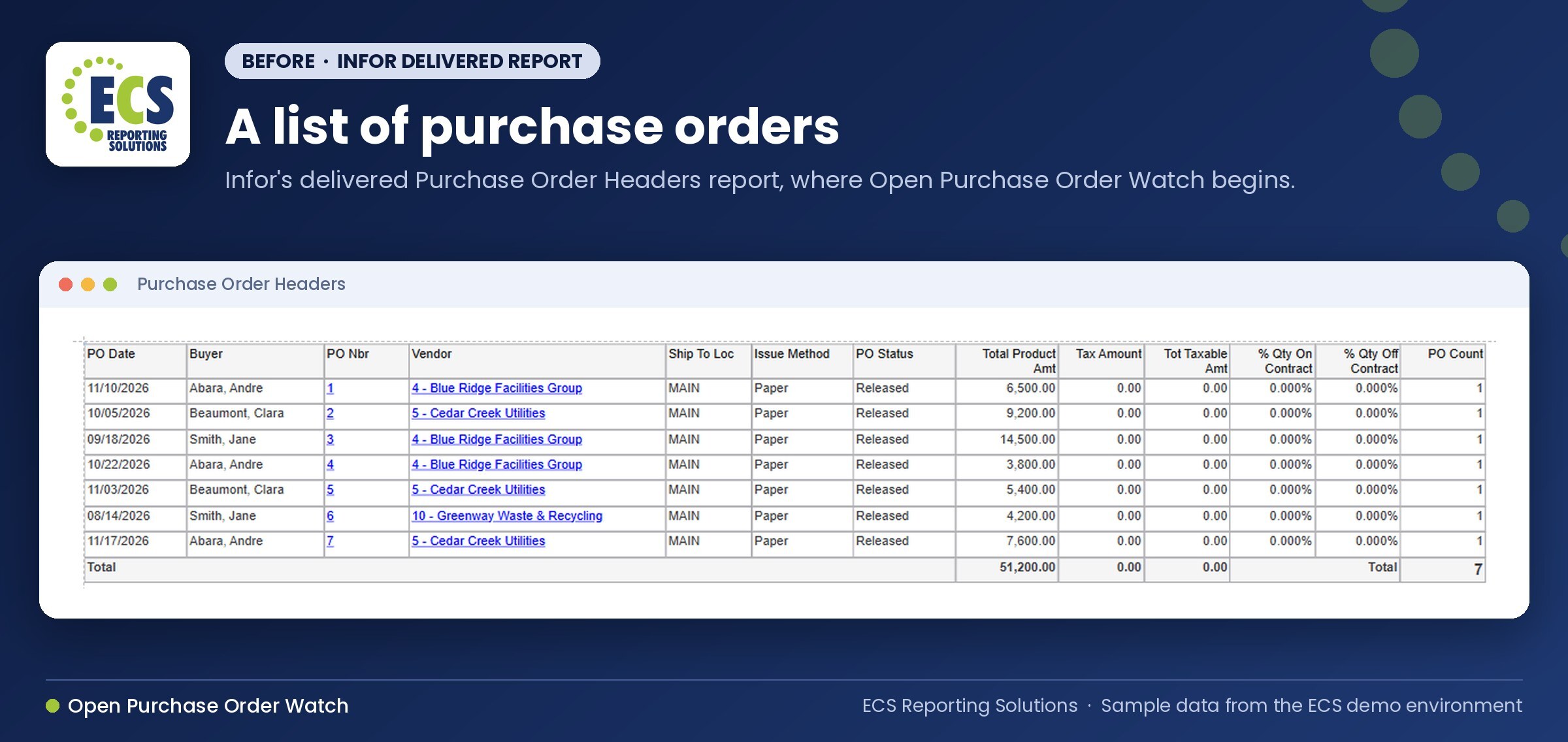
Infor's delivered Purchase Order Headers report lists each purchase order with its date, buyer, vendor, status and amount. To find the ones that are still open and have been open too long, purchasing has to work out the open amount and the age of each one.
AFTER · OPEN PURCHASE ORDER WATCH
Which purchase orders have been open too long?
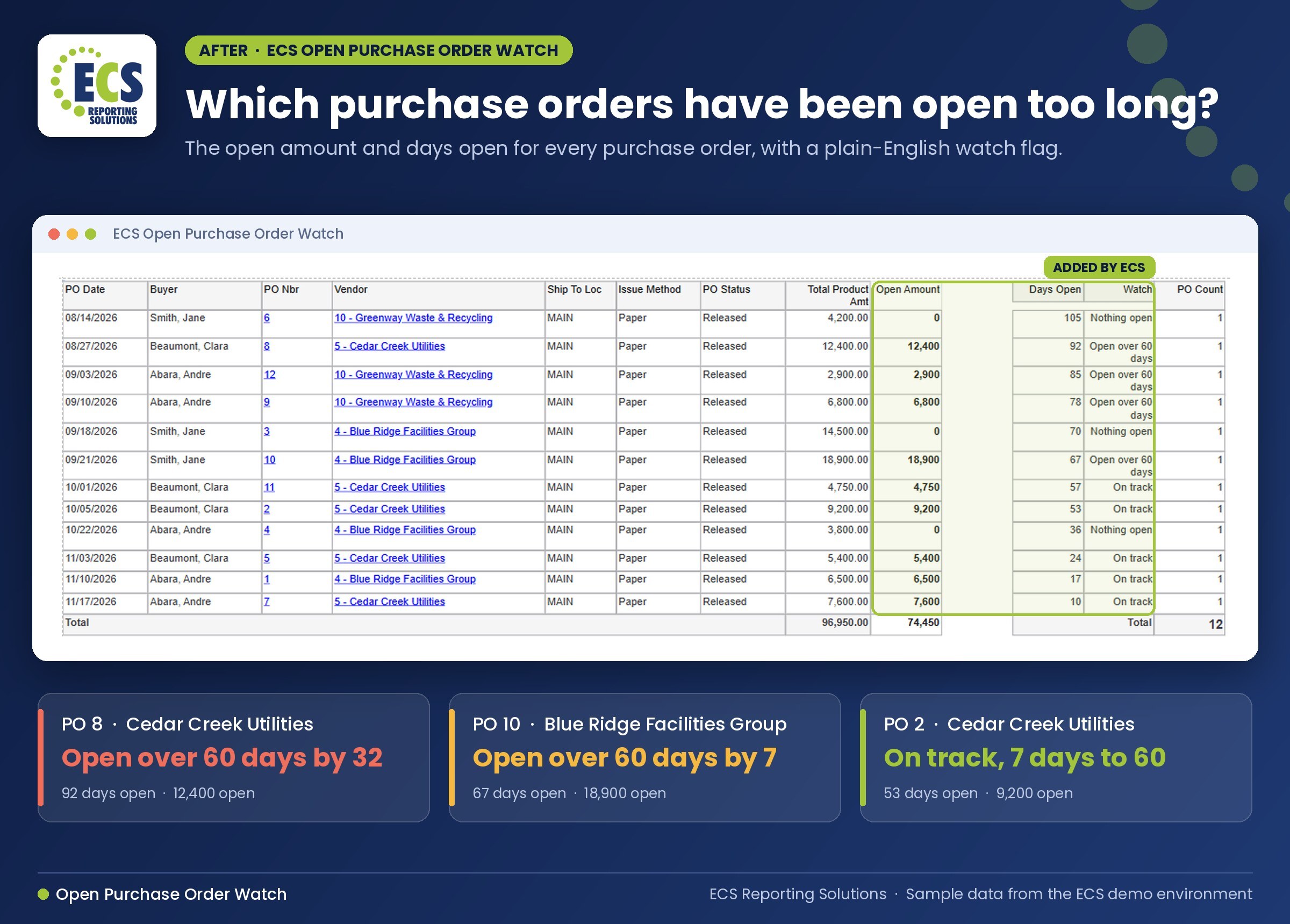
The same report, oldest first, with the amount still open on each purchase order, the days it has been open and a plain-English watch flag: Nothing open, On track, or Open over 60 days. The age limit is yours to set, so buyers see at a glance which ones need a decision.
Screenshots show sample data from the ECS demo environment. We confirm the fit with your setup in your free Private Reporting Review.
PROVE · IT TIES TO THE GENERAL LEDGER
The open amount agrees with your encumbrances
Open amount means ordered and not yet invoiced, which is what Infor carries as a purchase order encumbrance. Before go-live, your team ties the report three ways, and we review it.
| Source | Total |
|---|---|
| Open Purchase Order Watch, Open Amount | 74,450 |
| Purchasing, open encumbrances by purchase order | 74,450 |
| Global Ledger, encumbrance balance from purchase orders | 74,450 |
| Difference | 0 |
Sample data from the ECS demo environment. The ledger side is limited to purchase order encumbrances, because the ledger also carries encumbrances from other sources.
YOUR GOAL · REDUCE COSTS
How Open Purchase Order Watch reduces costs
A report does not reduce costs by itself. The savings come from a simple routine around it, which we set up with you in your Plan session and write into a one-page action plan.
1 · SEE
Purchasing looks each month
Purchasing opens Open Purchase Order Watch each month and sees the open amount and days open for each purchase order, oldest first, against the age limit you set.
2 · ACT
Every aged purchase order gets a decision
For each purchase order past the age limit, the buyer decides: close it, confirm it with the supplier, or follow up.
3 · RESULT
Purchasing and Finance follow up
Purchasing and Finance see which aged purchase orders were decided and follow up on the rest, so committed spend reflects what you still intend to buy.
Two measures, tracked in your Client Hub
IS THE ROUTINE HAPPENING?
Aged purchase orders reviewed each month
IS IT WORKING?
Open purchase orders older than your age limit
Your own starting numbers and targets are set in your Plan session.
Your Reduce costs path
Start with the package that fits best, and add the next one when you are ready, one at a time.
Budget Watch
Department budgets and overruns.
Project and Grant Budget Watch
The same view for projects and grants.
THIS PACKAGE
Open Purchase Order Watch
Committed spend that is still open, and how long it has been open.
WHY IT MATTERS
An open purchase order is money your organization has committed to spend. When old ones are never closed, they hold budget that is no longer needed.
They can also lead to deliveries and invoices that no one is expecting. A regular look at the oldest ones keeps commitments in line with what you still intend to buy.
WHAT YOUR TEAM BUILDS
- Open amount: what is still open on each purchase order, with a total
- Days open: how long each one has been open, oldest first, with its buyer
- A watch flag: Nothing open, On track or Open over 60 days, read against the age limit you set
- Checked against the general ledger: the open amount is tied to Infor's purchase order encumbrances before go-live
What you get for $8,500
01
Your team builds it
Your team makes every change in your own test space, guided step by step, so you can adjust it, and the next report, without us.
02
Knowledge transfer built in
We explain each step as your team builds, and leave you a build guide to keep. Your people learn how Open Purchase Order Watch works, so they can read it, adapt it and customize it later with our guidance.
03
Four live sessions
A 60-minute Plan session, two 90-minute working sessions and a wrap-up, all in week one and private to your team.
04
30 days of the ECS Reporting Advantage
Three weekly 30-minute results checks after the workshop week, ending with your first Value Scorecard, a 30-minute executive briefing and a tailored 90-day plan.
05
Your Client Hub
Your goal, its two measures, each results check, and what we recommend next.
06
Your one-page action plan
A 10-minute form and your Plan session: we confirm readiness and write down your goal, its two measures and starting numbers, and the routine that makes the report pay off.
07
Tie-out and handover check
Proof that Open Purchase Order Watch agrees with Infor's purchasing records, and a clear Ready or Not ready.
08
Owner instructions
How to run, review and adjust Open Purchase Order Watch each month, so it keeps working after we leave.
INCLUDED · YOUR MINI-COURSE
A mini-course to keep, built for Open Purchase Order Watch
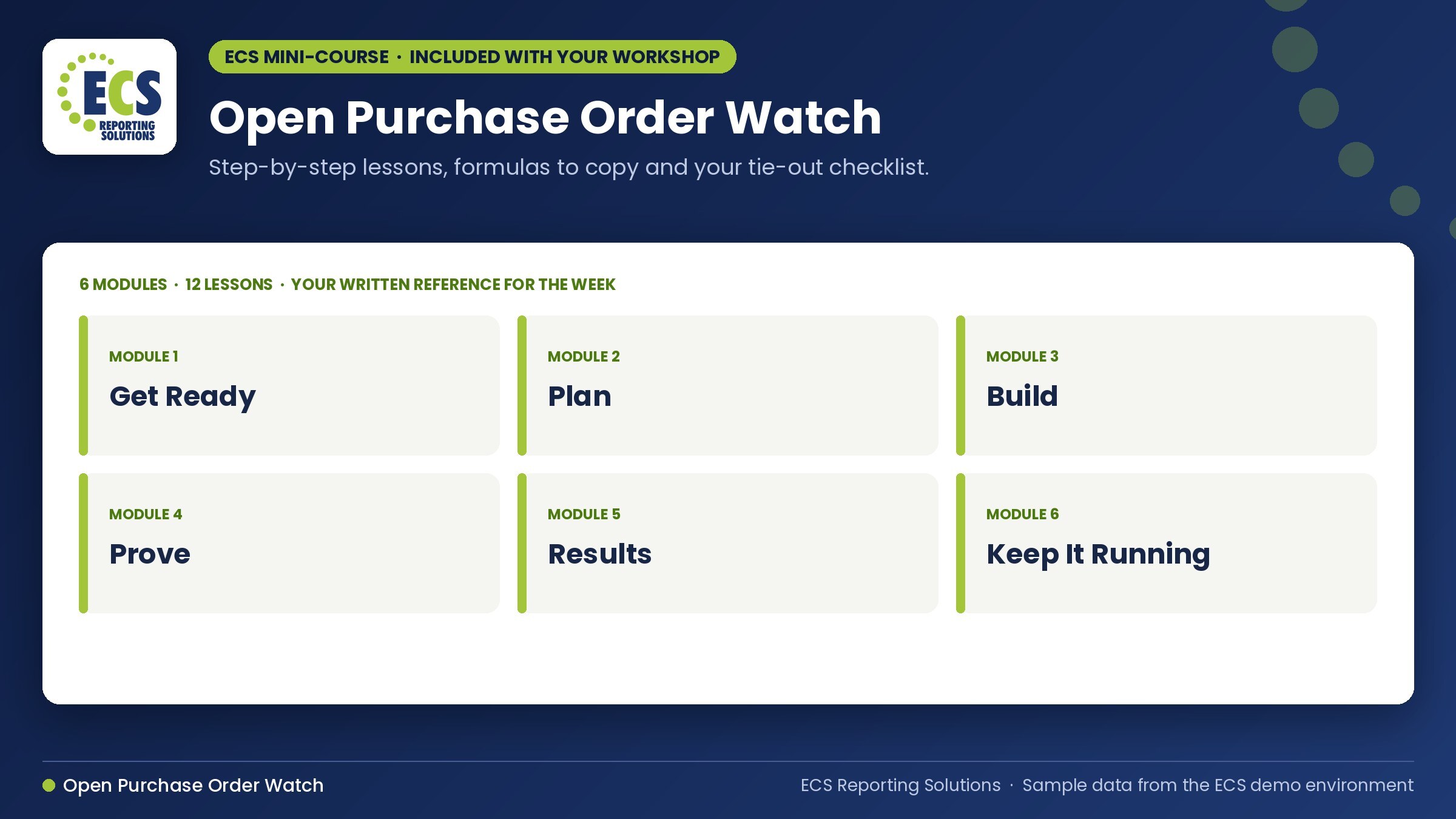
Every workshop comes with its own online mini-course. It is your written reference for the week and afterward: step-by-step lessons, the formulas to copy, your tie-out checklist and the owner instructions.
Six modules follow your week: Get Ready, Plan, Build, Prove, Results and Keep It Running. Up to 6 people on your team get access.
MAKE IT YOURS
Need something a little different? We can tailor it.
Open Purchase Order Watch is a complete package as it stands. If your team needs different measures, extra groupings or a layout of your own, we will scope the changes with you and send a clear quote before any work begins.
Customized by quote
Tell us what you would like changed. We confirm what it involves, what it costs and how long it takes, in writing, so you can decide with the full picture.
Knowledge transfer comes standard
We build alongside your team and explain each step as we go. Your people learn how the package works, so they can adjust it themselves later, with our guidance whenever they want it.
Your week
One week of guided implementation, in short scheduled sessions. Your team, or your partner, makes the changes in your system; we work alongside you at every step.
Your start date is confirmed in your free review, once your requirements and readiness checks are agreed.
MONDAY · PLAN
Plan session · 60 min
- Before the session: a 10-minute online form about how open purchase orders are reviewed today
- We bring a draft of your one-page action plan and finish it together
- Confirm readiness and the companies and buyers in scope
- Agree the age limit, owners and the monthly routine
TUESDAY TO WEDNESDAY · BUILD
Two working sessions · 90 min each
- Tuesday: start from the delivered report and add the open amount and days open
- Wednesday: add the watch flag and your age limit
- Your team drives; we guide
THURSDAY · PROVE
Tie-out · on your schedule
- Your team ties the open amount to Infor's purchase order encumbrances, in Purchasing and in the general ledger
- We review it and flag any gaps
FRIDAY · GO LIVE
Wrap-up · 30 min
- Handover check: Ready or Not ready, verified by ECS
- Owner instructions finalized
- We set your goal, its two measures and their starting numbers in your Client Hub
THEN · 30 DAYS OF THE ECS REPORTING ADVANTAGE, INCLUDED
- A 30-minute results check each week for the three weeks after the workshop week: is the routine happening, is the age limit right, what is in the way?
- Progress in your Client Hub each week.
- In the final week: your first Value Scorecard, a 30-minute executive briefing and a tailored 90-day plan.
The 30 days are part of the workshop price, and they never roll into a subscription on their own. How ECS Reporting Advantage works
READINESS
2-minute check: is your team ready?
- ✓ Purchase orders are created and received in Infor
- ✓ Your team uses an Infor reporting tool, with the delivered purchasing reports available
- ✓ Someone on your team, or a partner working with you, can edit report content in a test space
- ✓ Buyers have report access, or you have a plan to give it to them
Missing one? Book a free Private Reporting Review and we will tell you what it takes.
BEFORE BUYERS CAN USE IT
Let each buyer see their own purchase orders
To share Open Purchase Order Watch with buyers, each one needs report access and the right data security. If your security is already set up, we show your team how to share it. If not, your Infor partner can set it up alongside the workshop, quoted separately.
Want more changes?
A different layout, more groupings, another report: tell us what you need and we will send a fixed quote.
After the 30 days
Keep your expert and your Client Hub. With ECS Reporting Advantage, we show you every month whether the routine is happening and whether it is working, and recommend the next step.
Continue at $5,950 a month, month to month, with no minimum term. Nothing renews on its own: you decide on day 30.
WITH ECS REPORTING ADVANTAGE · YOUR CLIENT HUB
See whether the routine is working, month by month
Your Client Hub is organized by your reporting goal. It shows the two measures and their trend, this month's decision, your deliverables and what we recommend next. Your report stays in your Infor system.
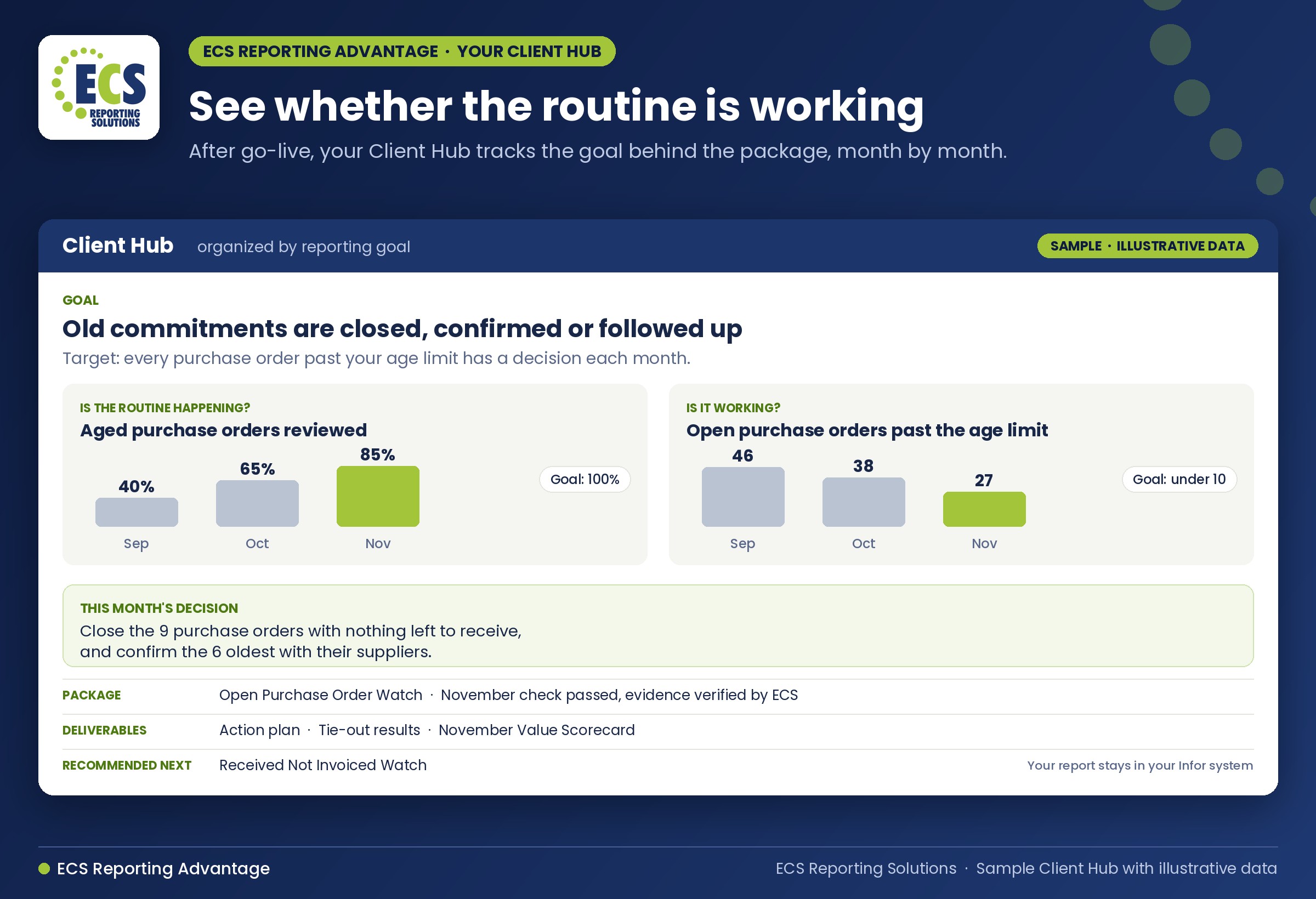
Sample Client Hub with illustrative data.
OPEN PURCHASE ORDER WATCH QUESTIONS
Infor already has purchasing reports. What does ECS add?
We start from the report Infor delivers and guide your team through specific improvements: the open amount, the days open and a watch flag read against your own age limit. Then we set up the routine and the two measures that turn the report into fewer old commitments.
How long does it take?
One hands-on week of guided implementation, then three weekly results checks. Fit and timing are confirmed in your free Private Reporting Review before you buy.
What does it cost?
$8,500, fixed, for up to 6 people. 30 days of the ECS Reporting Advantage are included. Any partner build time is quoted separately.
BOOK THE WORKSHOP
Open Purchase Order Watch · $8,500
Fixed price · up to 6 people · one week of guided implementation, with 30 days of the ECS Reporting Advantage included
