REDUCE MANUAL WORK · INFOR HR AND PAYROLL REPORTING

Headcount and Vacancy Watch

HR, Finance and department leaders see budgeted headcount, current staff and open positions in one report, with how full each position is and which vacancies are not yet in recruiting. In one hands-on week, your team builds it from the Budget Variance report Infor already delivers.

HANDS-ON PRIVATE WORKSHOP

$8,500

Fixed price · up to 6 people · one week of guided implementation · 30 days of the ECS Reporting Advantage included

Book the workshop

Before and after

BEFORE · THE DELIVERED REPORT

Budget, current staff and variance for each position

Infor's delivered Budget Variance report compares each position's budgeted headcount with its current staff and marks the positions that are short. It does not show how full each position is, whether anyone is recruiting for the openings, or a total.
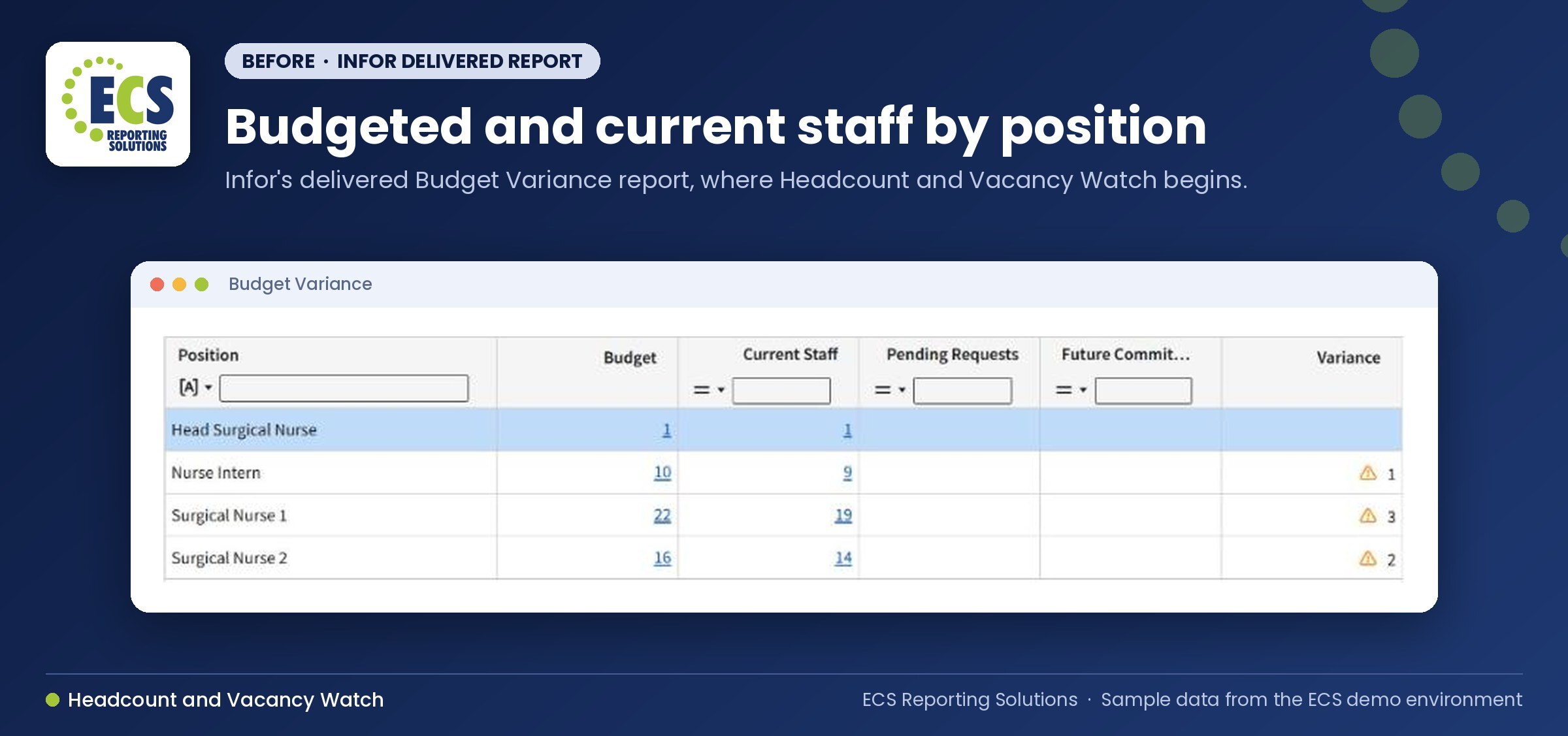
Infor delivered Budget Variance report showing budget, current staff and variance for four nursing positions

AFTER · HEADCOUNT AND VACANCY WATCH

How full each position is, and which vacancies nobody is recruiting for

Your own copy of the same report adds Percent Filled, a Not in Recruiting count (open positions less the openings on requisitions) and a total row. The delivered drill-down to the people in each position still works.
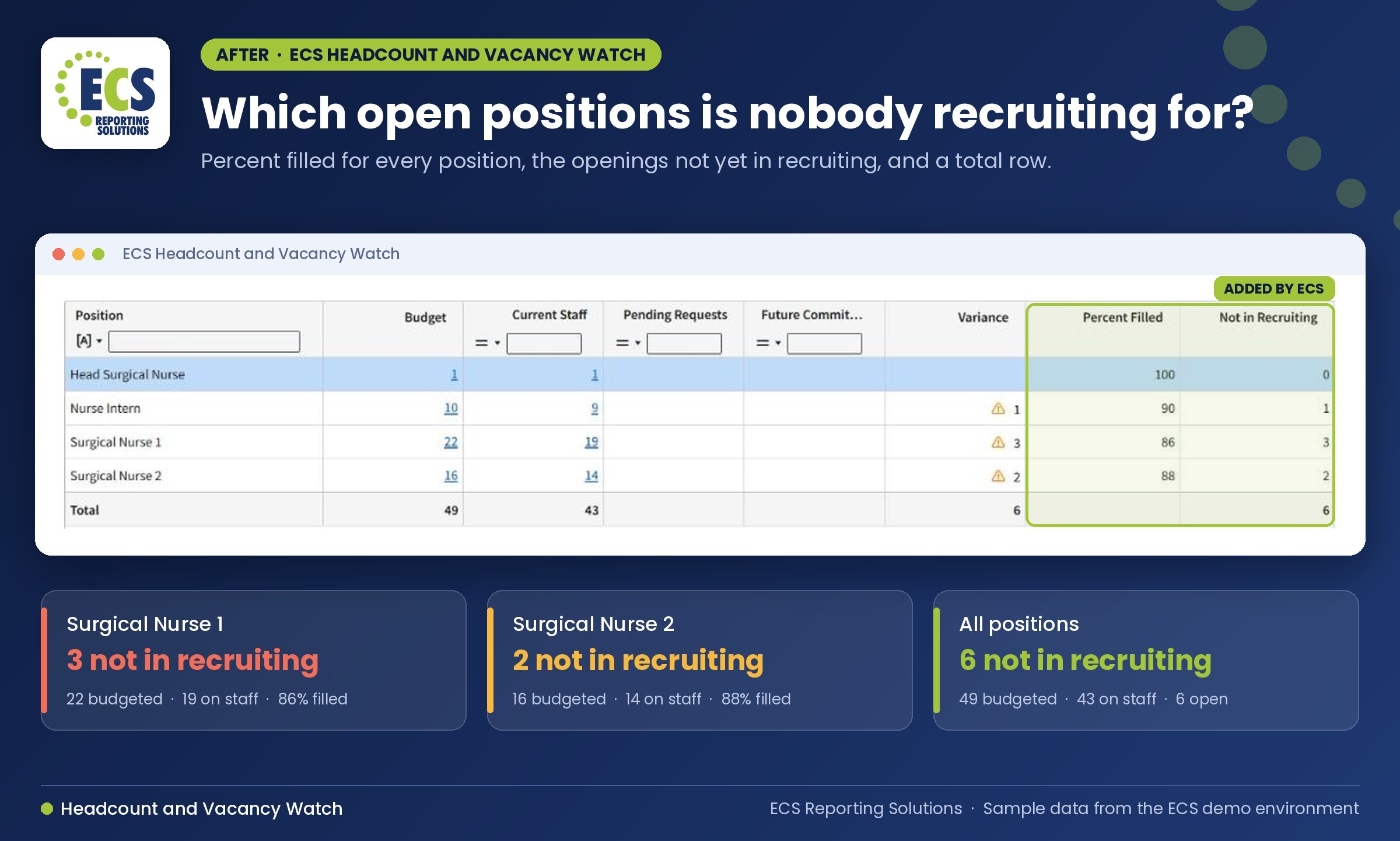
ECS Headcount and Vacancy Watch report with Percent Filled and Not in Recruiting columns and a total row added to the delivered report

Sample data from the ECS demo environment. Built as your own copy of the delivered report, with no configuration change. We confirm the fit with your position plan in your free Private Reporting Review.

PROOF · TIED TO INFOR HR

The report agrees with your HR records

Before go-live, your team ties current staff for each position to the active work assignments in Infor HR. Here is the check from the ECS demo.

PositionCurrent Staff on the reportActive work assignments in Infor HR
Surgical Nurse 11919
Surgical Nurse 21414
Head Surgical Nurse11
Nurse Intern99
Total4343

Difference: 0. Sample data from the ECS demo environment.

YOUR GOAL · REDUCE MANUAL WORK

How Headcount and Vacancy Watch reduces manual work

A report does not save time by itself. The time comes back from a simple routine around it, which we set up with you in your Plan session and write into a one-page action plan.

1 · SEE

Leaders look each month

HR, Finance and department leaders open Headcount and Vacancy Watch each month and see how full each position is and which vacancies are not yet in recruiting.

2 · ACT

Staffing questions are answered from the report

Leaders use the report for staffing questions, and raise only the exceptions with HR.

3 · RESULT

One-off requests fall away

HR stops answering the same headcount question many times, and the time goes to filling the open positions.

Two measures, tracked in your Client Hub

IS THE ROUTINE HAPPENING?

Headcount reviewed from the report each month

IS IT WORKING?

One-off headcount requests to HR each month

Your own starting numbers and targets are set in your Plan session.

Your Reduce manual work path

Start with the package that fits best, and add the next one when you are ready, one at a time.

Financial Statement Build

Statements ready in Infor after close.

Payables Aging Watch

Aging by vendor and due date, before each payment run.

THIS PACKAGE

Headcount and Vacancy Watch

Budgeted, filled and open positions, and which are in recruiting.

WHY IT MATTERS

How many people do we have, how many positions are open, and is anyone recruiting for them? These are some of the most common questions HR is asked, by Finance, by department leaders and by executives.

When each answer is prepared by hand, the same work is repeated every month, and a vacancy with no requisition can stay open unnoticed.

WHAT YOUR TEAM BUILDS

  • Percent Filled: current staff as a percent of budget, for each position
  • Not in Recruiting: open positions that have no requisition yet
  • A total row: budget, current staff and open positions across the plan
  • Checked against HR: current staff for each position is tied to active work assignments before go-live

What you get for $8,500

01

Your team builds it

Your team makes every change in your own test space, guided step by step, so you can adjust it, and the next report, without us.

02

Knowledge transfer built in

We explain each step as your team builds, and leave you a build guide to keep. Your people learn how Headcount and Vacancy Watch works, so they can read it, adapt it and customize it later with our guidance.

03

Four live sessions

A 60-minute Plan session, two 90-minute working sessions and a wrap-up, all in week one and private to your team.

04

30 days of the ECS Reporting Advantage

Three weekly 30-minute results checks after the workshop week, ending with your first Value Scorecard, a 30-minute executive briefing and a tailored 90-day plan.

05

Your Client Hub

Your goal, its two measures, each results check, and what we recommend next.

06

Your one-page action plan

A 10-minute form and your Plan session: we confirm readiness and write down your goal, its two measures and starting numbers, and the routine that makes the report pay off.

07

Tie-out and handover check

Proof that Headcount and Vacancy Watch agrees with Infor's HR records, and a clear Ready or Not ready.

08

Owner instructions

How to run, review and adjust Headcount and Vacancy Watch each month, so it keeps working after we leave.

INCLUDED · YOUR MINI-COURSE

A mini-course to keep, built for Headcount and Vacancy Watch

Every workshop comes with its own online mini-course. It is your written reference for the week and afterward: step-by-step lessons, the settings to copy, your tie-out checklist and the owner instructions.

Up to 6 people on your team get access.
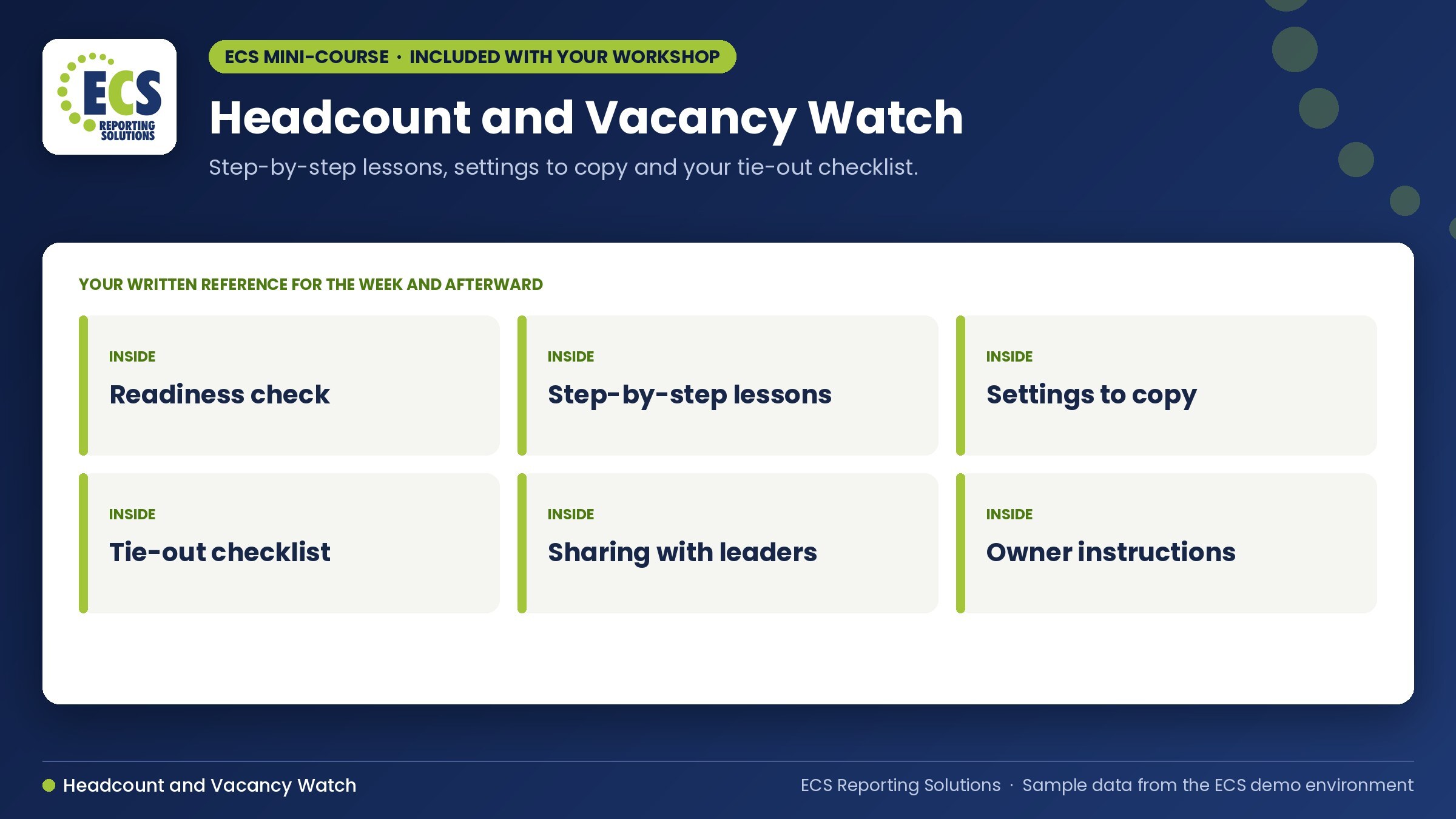
Headcount and Vacancy Watch mini-course showing what is inside

MAKE IT YOURS

Need something a little different? We can tailor it.

Headcount and Vacancy Watch is a complete package as it stands. If your team needs different measures, extra groupings or a layout of your own, we will scope the changes with you and send a clear quote before any work begins.

Customized by quote

Tell us what you would like changed. We confirm what it involves, what it costs and how long it takes, in writing, so you can decide with the full picture.

Knowledge transfer comes standard

We build alongside your team and explain each step as we go. Your people learn how the package works, so they can adjust it themselves later, with our guidance whenever they want it.

Your week

One week of guided implementation, in short scheduled sessions. Your team, or your partner, makes the changes in your system; we work alongside you at every step.

Your start date is confirmed in your free review, once your requirements and readiness checks are agreed.

MONDAY · PLAN

Plan session · 60 min

  • Before the session: a 10-minute online form about how headcount questions are answered today
  • We bring a draft of your one-page action plan and finish it together
  • Confirm readiness and the positions in scope
  • Agree definitions, owners and the monthly routine

TUESDAY TO WEDNESDAY · BUILD

Two working sessions · 90 min each

  • Tuesday: make your own copy of the delivered Budget Variance report and add Percent Filled
  • Wednesday: add Not in Recruiting and the total row
  • Your team drives; we guide

THURSDAY · PROVE

Tie-out · on your schedule

  • Your team ties current staff for each position to active work assignments in Infor HR
  • We review it and flag any gaps

FRIDAY · GO LIVE

Wrap-up · 30 min

  • Handover check: Ready or Not ready, verified by ECS
  • Owner instructions finalized
  • We set your goal, its two measures and their starting numbers in your Client Hub

THEN · 30 DAYS OF THE ECS REPORTING ADVANTAGE, INCLUDED

  • A 30-minute results check each week for the three weeks after the workshop week: is the routine happening, is the view right, what is in the way?
  • Progress in your Client Hub each week.
  • In the final week: your first Value Scorecard, a 30-minute executive briefing and a tailored 90-day plan.

The 30 days are part of the workshop price, and they never roll into a subscription on their own. How ECS Reporting Advantage works

READINESS

2-minute check: is your team ready?

  • ✓ Positions and work assignments are kept up to date in Infor
  • ✓ You have an active position plan with a headcount budget, and the delivered Budget Variance report is available
  • ✓ Someone on your team, or a partner working with you, can create a report copy in the Report Catalog
  • ✓ Department leaders have report access, or you have a plan to give it to them

Missing one? Book a free Private Reporting Review and we will tell you what it takes.

BEFORE LEADERS CAN USE IT

Let each leader see only their department

To share Headcount and Vacancy Watch with department leaders, each one needs report access and data security that limits them to their own department. If your security is already set up, we show your team how to share it. If not, your Infor partner can set it up alongside the workshop, quoted separately.

Want more changes?

A different layout, more groupings, another report: tell us what you need and we will send a fixed quote.

Request a quote

After the 30 days

Keep your expert and your Client Hub. With ECS Reporting Advantage, we show you every month whether the routine is happening and whether it is working, and recommend the next step.

Continue at $5,950 a month, month to month, with no minimum term. Nothing renews on its own: you decide on day 30.

How ECS Reporting Advantage works

WITH ECS REPORTING ADVANTAGE · YOUR CLIENT HUB

See whether the routine is working, month by month

Your Client Hub is organized by your reporting goal. It shows the two measures and their trend, this month's decision, your deliverables and what we recommend next. Your report stays in your Infor system.
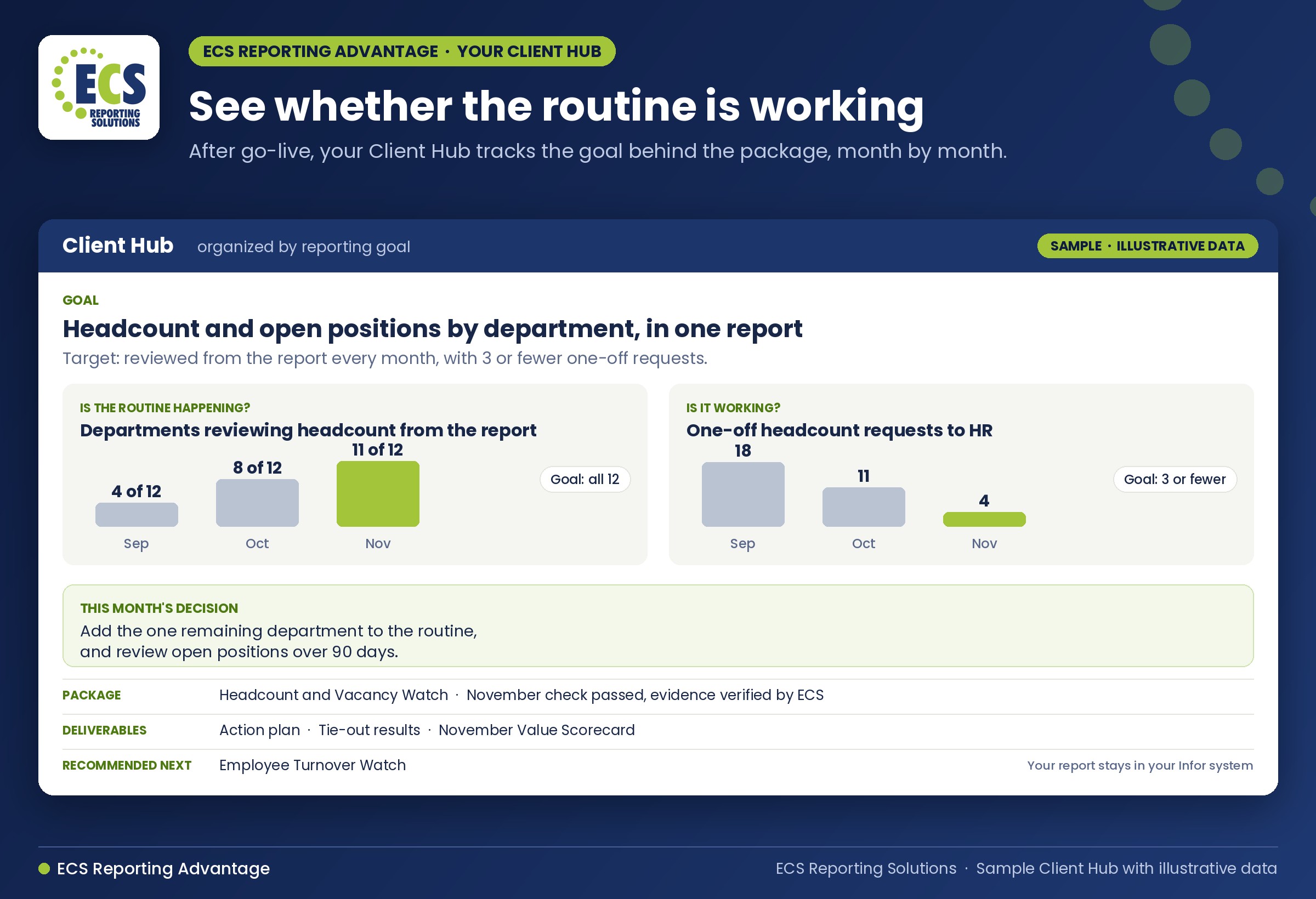
Sample ECS Client Hub for Headcount and Vacancy Watch showing the reporting goal, two measures with a three-month trend, this month's decision, deliverables and the recommended next step

Sample Client Hub with illustrative data.

HEADCOUNT AND VACANCY WATCH QUESTIONS

Infor already has position reports. What does ECS add?

We start from the Budget Variance report Infor delivers and guide your team through specific improvements: how full each position is, which vacancies are not yet in recruiting, and a total row. Then we set up the routine and the two measures that turn the report into fewer one-off requests.

How long does it take?

One hands-on week of guided implementation, then three weekly results checks. Fit and timing are confirmed in your free Private Reporting Review before you buy.

What does it cost?

$8,500, fixed, for up to 6 people. 30 days of the ECS Reporting Advantage are included. Any partner build time is quoted separately.

BOOK THE WORKSHOP

Headcount and Vacancy Watch · $8,500

Fixed price · up to 6 people · one week of guided implementation, with 30 days of the ECS Reporting Advantage included

Book a free Private Reporting Review