INFOR HR TURNOVER REPORTING · HR AND PAYROLL

Employee Turnover Watch

See which departments are losing people, why they are leaving, and whether the fix is working. In one hands-on week, your team builds Employee Turnover Watch from the Turnover Analysis reports Infor already delivers.

HANDS-ON PRIVATE WORKSHOP

$8,500

Fixed price · up to 6 people · one week of guided implementation · 30 days of the ECS Reporting Advantage included

Book the workshop

Request an invoice instead

WHY TURNOVER MATTERS

Every departure costs more than the vacancy

Most organizations already know their turnover rate. What they often cannot see is where it is happening, why people left, and whether anything they tried made a difference.

It costs money

Each person who leaves has to be replaced: recruiting, agency staff or overtime to cover the gap, and weeks of onboarding and training before the new hire is fully productive.

It strains the team that stays

Colleagues pick up the extra shifts and the extra work. Service suffers, overtime climbs, and the next resignation often comes from the same team.

It hides in the average

An organization-wide rate can look healthy while one department keeps losing people. And a rate alone does not tell you whether people chose to leave or were let go.

Employee Turnover Watch puts each department's rate next to who chose to leave, who was let go, and why, so you know where to act and what kind of action it needs.

Before and after

BEFORE · INFOR DELIVERED REPORT

Every turnover action, one line at a time
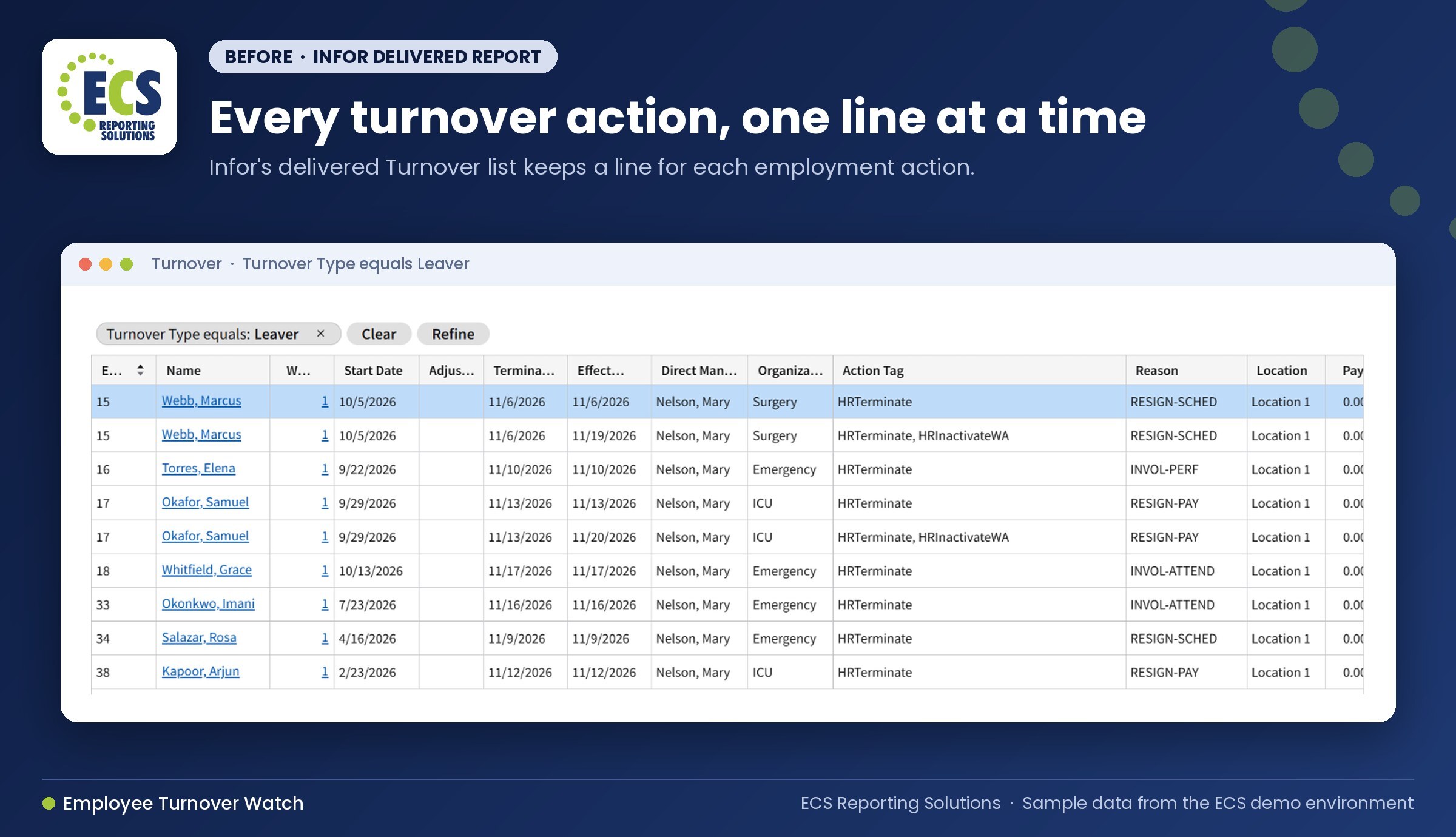
Infor delivered Turnover list filtered to leavers, showing a line for each employment action with its action tag and reason

Infor's delivered Turnover list is accurate and complete. It keeps a line for each employment action, so someone who is terminated and then has their work assignment closed appears on two lines, and a leader has to count the people and read the reason codes for themselves.

AFTER · EMPLOYEE TURNOVER WATCH

One row for each person who left, with why and whether they chose to go
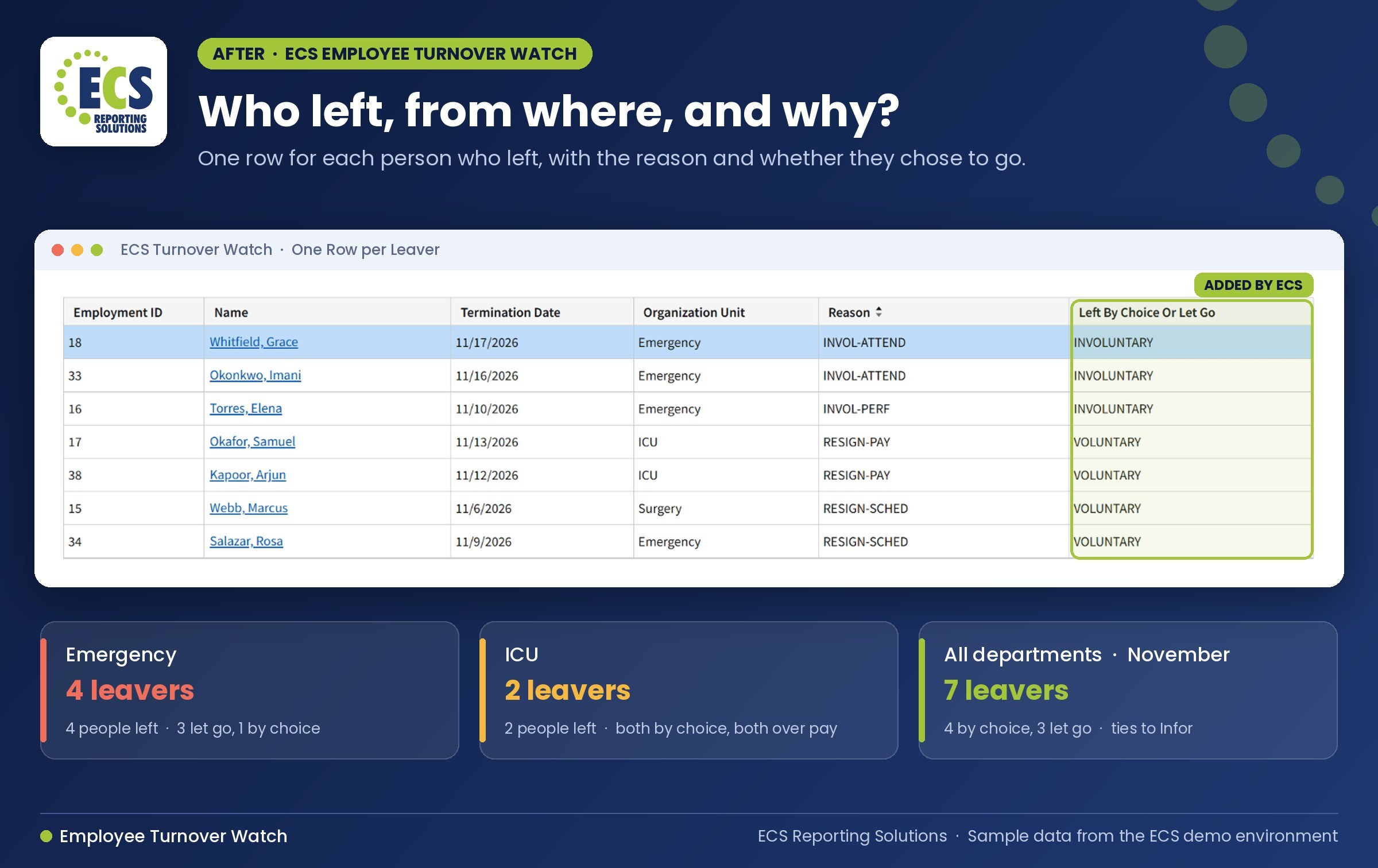
ECS Employee Turnover Watch showing one row per leaver with termination date, department, reason and whether they left by choice or were let go

Each person appears once, with their department, their reason, and a plain answer to the question leaders ask first: did they choose to leave, or were they let go? Emergency lost four people and three were let go. Intensive Care lost two, both over pay. Each needs a different action.

Screenshots show sample data from the ECS demo environment. Fit for your own setup is confirmed in the free Private Reporting Review.

PROOF · IT TIES TO YOUR HR RECORDS

Everyone on Employee Turnover Watch is someone who left, counted once

EMPLOYEE TURNOVER WATCH

7 leavers

November, one row per person

INFOR HR WORK ASSIGNMENTS

7 no longer active

The same seven people, name by name

DIFFERENCE

0

7 of 7 agree

Before go-live, your team runs the same check on one of your own closed months, person by person, so leaders trust the list from day one.

Then read it beside each department's rate

Infor's delivered Turnover Analysis already gives each department's turnover rate. Your team keeps its own copy and reads it against the target you set, with the leavers view beside it.

ILLUSTRATION · SAMPLE NUMBERS

DepartmentTurnoverChose to leaveLet goTop reason
Surgery4.7%11Schedule (1)
Emergency20.3%52Schedule (4)
Intensive Care18.9%41Better pay (3)
Pediatrics3.2%10Better pay (1)
Radiology5.6%01Performance (1)
Pharmacy20.0%22Attendance (2)

Same rate, different problems: Emergency is losing people over schedules, while half of Pharmacy's leavers were let go.

Shown together here for illustration, with sample numbers for one quarter. In Infor, the rate and the leavers detail are two views your team builds. The drill-down to the people behind each number stays where it is, in the delivered Turnover Analysis.

YOUR GOAL · REDUCE COSTS

How Employee Turnover Watch reduces costs

A report does not keep people from leaving. The savings come from a simple monthly routine around it, which we set up with you in your Plan session and write into a one-page action plan.

1 · SEE

HR reviews Employee Turnover Watch each month

HR opens Employee Turnover Watch after month end and shares the numbers and reasons for each department above your target with its leader.

2 · ACT

Every department above target gets an action

Where people chose to leave, the leader looks at the reasons given, such as pay or schedule, and agrees one change with HR. Where people were let go, HR and the leader look at hiring and the first 90 days.

3 · RESULT

HR follows up

HR sees which departments have an action in place and whether their rate is moving, so problems are worked on while they are still small.

Two measures, tracked in your Client Hub

IS THE ROUTINE HAPPENING?

Departments above target with an action agreed each month

Example: 1 of 5 before · 4 of 5 now · target 5 of 5

IS IT WORKING?

Departments above your target turnover rate

Example: 5 before · 3 now · target 1

Illustrative example with sample data. Your own starting numbers are set in your Plan session.

Your Reduce costs path

Employee Turnover Watch is the first step. Add the next package when you are ready, one at a time.

START HERE

Employee Turnover Watch

Which departments are losing people, and why.

NEXT

First-Year Retention

How many new hires stay past their first year.

THEN

Overtime Watch

Overtime by department, before it becomes a budget overrun.

DESCRIPTION

Employee Turnover Watch starts from the Turnover Analysis reports that Infor delivers in the HR Report Catalog. They already show headcount, starters, leavers and the turnover rate by organization unit, with drill-down to the people.

In the workshop, your team builds two focused views from them: your own copy of the department turnover report, read against the target you set, and a leavers view that shows each person's department, their reason, and whether they chose to leave or were let go. Nothing delivered is changed; your views are your own copies.

WHY IT MATTERS

Replacing people is expensive, and the cost lands on the departments least able to absorb it.

When HR can only quote one overall rate, leaders cannot tell whether their own department is the problem, and nobody can say whether last quarter's changes helped.

FEATURES

  • Rate against your target — every department's turnover rate in one view, read against the target you set
  • Chose to leave or let go — each leaver shown with their department, their reason, and whether they left by choice or were let go
  • Trend — each department against its own starting number
  • Drill-down — the delivered Turnover Analysis still takes you to the people behind each number
  • Tied to your HR records — one closed month checked person by person before go-live

BENEFITS

  • Know where to act. Each department's rate, against your target.
  • Match the fix to the cause. Resignations and dismissals need different actions.
  • See if it worked. The same departments, tracked every month.
  • Trusted numbers. The views tie to your terminations, so the conversation is about people, not the report.

What you get for $8,500

01

Your team builds it

Your team makes every change in your own Infor environment, guided step by step, so you can adjust it, and the next report, without us. We show you the finished version in our demo system first, so everyone knows what they are building.

02

Knowledge transfer built in

We explain each step as your team builds, and leave you a build guide to keep. Your people learn how Employee Turnover Watch works, so they can read it, adapt it and customize it later with our guidance.

03

Four live sessions

A 60-minute Plan session, two 90-minute working sessions and a wrap-up, all in week one, private to your team, and led by an ECS associate or a partner consultant working with ECS. ECS sets the learning plan and checks the result.

04

30 days of the ECS Reporting Advantage

Three weekly 30-minute results checks after the workshop week: we measure progress against your goal and help with anything blocking your team. It ends with your first Value Scorecard, an assessment of one next opportunity, a 30-minute executive briefing and a tailored 90-day plan.

05

Your Client Hub

Your goal and its measured result, each results check, and the opportunities beyond this workshop's scope that we think would help next.

06

Your one-page action plan

A 10-minute form and your Plan session: we confirm readiness and write down your goal, its two measures and starting numbers, and the monthly routine that makes the report pay off.

07

Tie-out and handover check

Proof that Employee Turnover Watch agrees with your HR records, and a clear Ready or Not ready.

08

Owner instructions

How to run, review and adjust Employee Turnover Watch each month, so it keeps working after we leave.

INCLUDED · YOUR MINI-COURSE

A mini-course to keep, built for Employee Turnover Watch

Every workshop includes an online mini-course: your written reference during the week and afterward.

  • Step-by-step lessons that follow your week
  • Filters to copy, so nobody retypes them
  • Your tie-out checklist and owner instructions
  • Six modules: Get Ready, Plan, Build, Prove, Results and Keep It Running

Up to 6 people on your team get access.
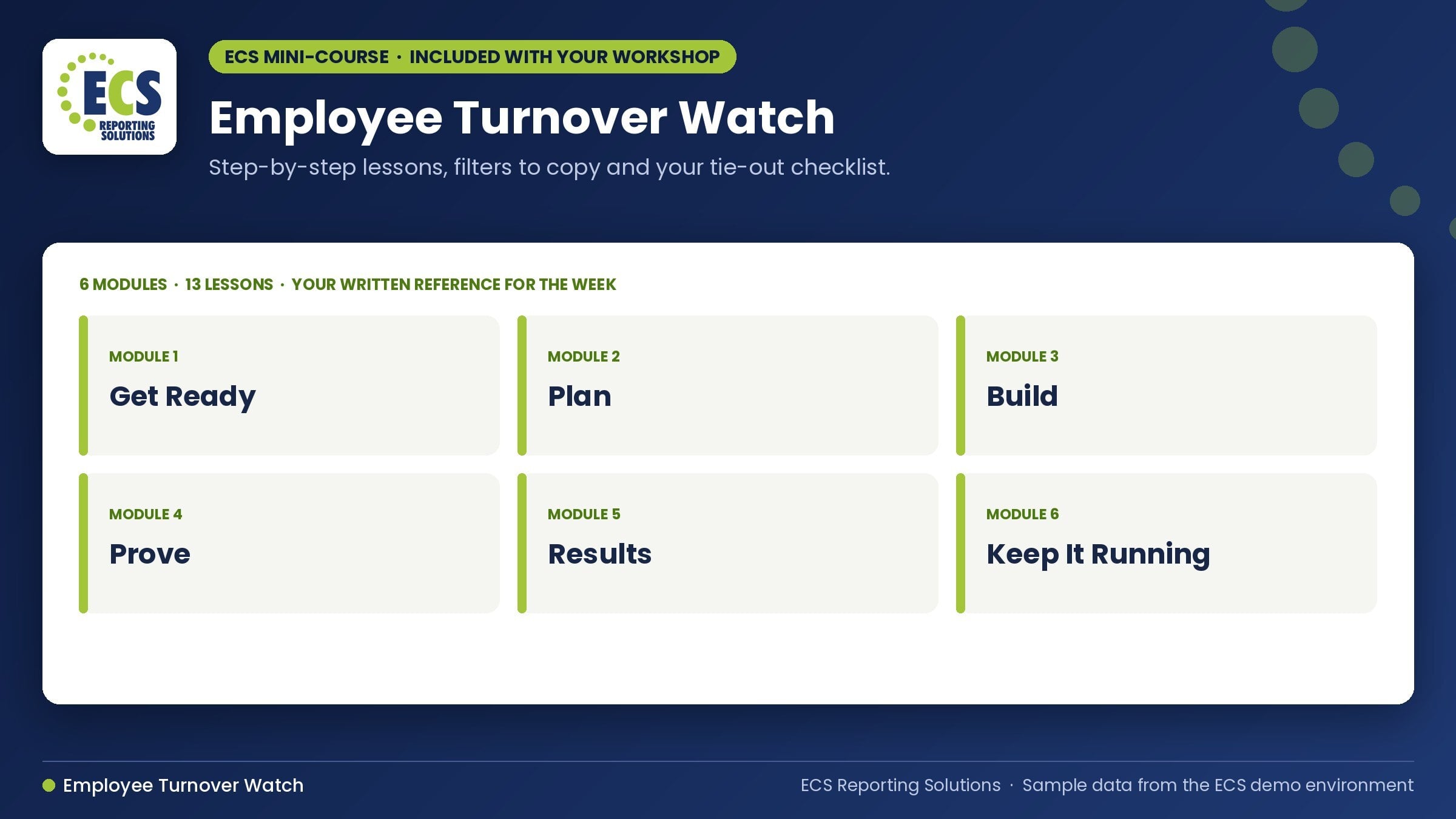
Employee Turnover Watch mini-course showing its six modules

MAKE IT YOURS

Need something a little different? We can tailor it.

Employee Turnover Watch is ready to go as it stands. If your team needs different measures, extra groupings or a layout of your own, we will scope the changes with you and send a clear quote before any work begins.

Customized by quote

Tell us what you would like changed. We confirm what it involves, what it costs and how long it takes, in writing, so you can decide with the full picture.

Knowledge transfer comes standard

We build alongside your team and explain each step as we go. Your people learn how the package works, so they can adjust it themselves later, with our guidance whenever they want it.

Your week

One week of guided implementation, about 6 hours of your team's time when the readiness checks below are in place. Your team, or your partner, makes the changes in your tenant; we work alongside you at every step.

Your start date is confirmed in your free review, once your requirements and readiness checks are agreed.

MONDAY · PLAN

Plan session · 60 min

  • Before the session: a 10-minute online form about how turnover is reviewed today
  • We bring a draft of your one-page action plan and finish it together
  • Confirm readiness
  • Agree your target turnover rate and which departments are in scope
  • Agree who reviews Employee Turnover Watch and the monthly routine
  • We demo the finished Employee Turnover Watch and share the build guide

TUESDAY–WEDNESDAY · BUILD

Two working sessions · 90 min each

  • Tuesday: copy the delivered turnover report and read it against your target
  • Wednesday: build the leavers view: department, reason, and whether each person chose to leave or was let go
  • Your team drives; we guide

THURSDAY · PROVE

Tie-out · on your schedule

  • Your team ties one closed month's leavers, person by person, to your termination records
  • We review it and flag any gaps

FRIDAY · GO LIVE

Wrap-up · 30 min

  • Handover check: Ready or Not ready, verified by ECS
  • You approve, and HR starts using Employee Turnover Watch
  • Owner instructions finalized
  • We set your goal, its two measures and their starting numbers in your Client Hub

THEN · 30 DAYS OF THE ECS REPORTING ADVANTAGE, INCLUDED

See how ECS Reporting Advantage works, on your own reporting

  • A 30-minute results check each week for the three weeks after the workshop week: is the monthly routine happening, is the target right, what's in the way?
  • Progress in your Client Hub each week: your goal, the number, bottlenecks cleared, and opportunities beyond this workshop's scope.
  • In the final week: your first Value Scorecard, an assessment of one next opportunity from your Client Hub, a 30-minute executive briefing and a tailored 90-day plan.

The 30 days are part of the workshop price, and they never roll into a subscription on its own. Your team owns what it builds. If the 30 days are useful, we recommend continuing with ECS Reporting Advantage: each month we find the next improvement, define it, verify it worked, and show you the evidence. How ECS Reporting Advantage works →

READINESS

2-minute check: is your team ready?

  • ✓ Infor HR is in use, with the delivered Turnover Analysis reports available in the Report Catalog
  • ✓ Terminations are recorded with a reason
  • ✓ Your termination statuses separate people who chose to leave from people who were let go
  • ✓ Someone on your team with HR administrator access, or a partner working with you, can join the sessions

Missing one? Book a free Private Reporting Review and we'll tell you what it takes.

BEFORE LEADERS CAN USE IT

How department leaders get their numbers

Infor limits its turnover reports to HR administrators and HR generalists. So HR runs Employee Turnover Watch and shares each department's numbers and reasons with its leader.

In your Plan session we agree how that sharing works for you, and write it into your action plan.

Want more changes?

Turnover by manager, by job or by location, or a different layout: tell us what you need and we'll send a fixed quote.

Request a quote →

After the 30 days

Keep your expert and your Client Hub. With ECS Reporting Advantage, each month we find the next reporting improvement, define it, verify it worked, and show you the evidence in your Value Scorecard.

Continue at $5,950 a month, month to month, with no minimum term. Nothing renews on its own: you decide on day 30.

How ECS Reporting Advantage works →

WITH ECS REPORTING ADVANTAGE · YOUR CLIENT HUB

See whether the routine is working, month by month

Your Client Hub is organized by your reporting goal. It shows the two measures and their trend, this month's decision, your deliverables and what we recommend next. Your report stays in your Infor system.
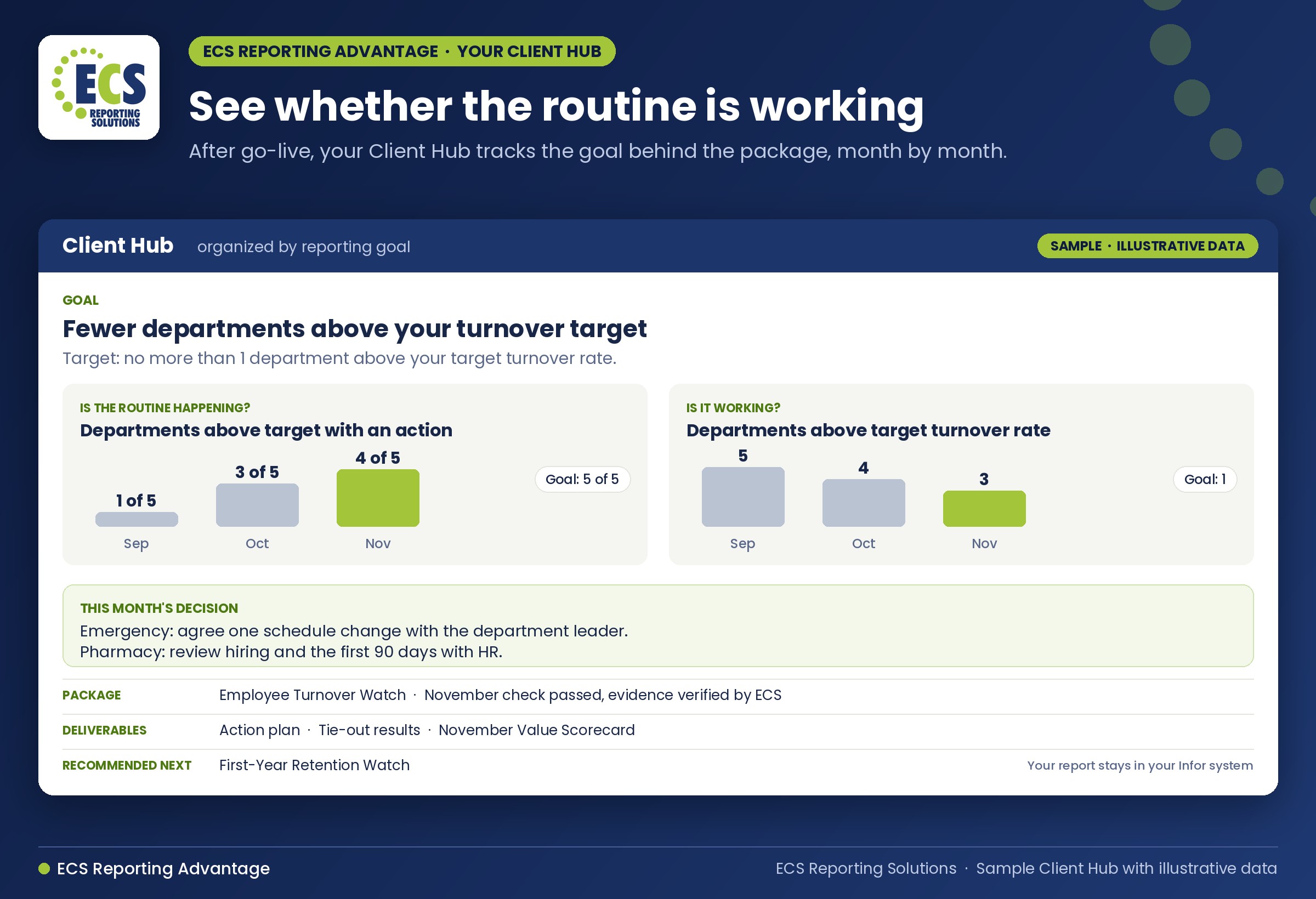
Sample ECS Client Hub for Employee Turnover Watch showing the reporting goal, two measures with a three-month trend, this month's decision, deliverables and the recommended next step

Sample Client Hub with illustrative data.

EMPLOYEE TURNOVER WATCH QUESTIONS

Infor already has turnover reports. What does this add?

The delivered reports give you the complete picture. Employee Turnover Watch is built from them and adds what leaders need to act: each department's rate against your target, who chose to leave and who was let go, with the reasons, and a monthly routine with two measures so you can see whether it is working.

Do we need Birst?

No. Employee Turnover Watch uses the turnover reports in the Infor HR Report Catalog. No additional Infor module is required.

Does it change our Infor configuration?

No. Your team works on its own copies of the delivered reports. The delivered reports stay as they are.

How long does it take to build?

One hands-on week of guided implementation. Before go-live, your team ties one closed month's leavers to your termination records. Timing depends on the readiness checks above being in place and your team or partner being available that week.

What does it cost?

$8,500, fixed, for up to 6 people. 30 days of the ECS Reporting Advantage are included. Fit is confirmed in the free Private Reporting Review before you buy.

BOOK THE WORKSHOP

Employee Turnover Watch · $8,500

Fixed price · up to 6 people · one week of guided implementation, with 30 days of the ECS Reporting Advantage included

Book a free Private Reporting Review

Request an invoice instead