YOUR CLIENT-SIDE REPORTING ARCHITECT · INFOR CLOUDSUITE
Reports don't tie?
Close takes too long?
Let's fix it, and prove it against your ledger.
ECS finds what's holding your reporting back, guides your team through the fix, starting with what Infor already delivers, and checks the result against your ledger before we call it done.
Find your starting point ↓ Book a free Fit Check
Free Pathfinder · Published prices · Done means it ties
How ECS works
Start with what Infor delivers. If Infor already ships it, we'll tell you, even when that means less work for us.
Your team makes the changes. We guide your team through the build, so the know-how stays with you.
Done means it ties. Every engagement ends with a check against your ledger and written owner instructions.
Infor Partner Network member · Over 20 years of Infor and Lawson reporting · Infor CloudSuite Financials · Birst · Application Studio · GL Report Designer · PMI-certified project leadership
Healthcare · Public sector & education · Manufacturing · Retail · Financial services · Food & beverage
ECS PATHFINDER
What's holding your reporting back?
Pick the problem closest to yours to see where to start, who does the work and how you'll know it's working. Free, two minutes, no sign-up.
Free checks you can run today: AP Tie Check · Missing Account Check
More problems, or several at once? Choose from the full list below.
Which problem sounds most like yours?
Choose one to see your suggested starting point.
GOAL CATEGORY: TRUST THE NUMBERS
Our statements don't tie to the ledger
START WITH A CALLSupports: Trust the numbers
Start: Report Tie-Out
Prove each statement against the ledger every month, line by line, and keep the evidence your controller and auditor will ask for.
WHAT YOUR TEAM DOES NEXT
Run the tie-out before the statement is released; route any difference to the report owner.
HOW YOU'LL KNOW IT'S WORKING
Statements released with a completed tie-out; days from close to release.
An account is missing from our statements
START WITH A CALLSupports: Trust the numbers
Start: Missing Account Check
Find accounts that never reached your reporting chart. A tie-out cannot catch this, because both sides read the same chart.
WHAT YOUR TEAM DOES NEXT
Run the check before each release and map any new account the same day.
HOW YOU'LL KNOW IT'S WORKING
Unmapped accounts found before release, not after.
A new controller or CFO wants statements they can trust
STATEMENT BUILDSupports: Trust the numbers
Start: 30-Day Statement Build
A blueprint for the statement, guided build by your team, and a live check against your ledger at handover.
WHAT YOUR TEAM DOES NEXT
Your builder follows the blueprint; your controller signs off the handover check.
HOW YOU'LL KNOW IT'S WORKING
A statement that ties, with an owner and written instructions.
GOAL CATEGORY: CLOSE FASTER
AP doesn't tie to the G/L
START WITH A CALLSupports: Close faster
Start: Report Tie-Out (AP to G/L)
Tie open payables to the AP control account as of period end using a delivered report, then age them.
WHAT YOUR TEAM DOES NEXT
Run it each close; route any difference to the payables owner.
HOW YOU'LL KNOW IT'S WORKING
Months tied to the penny; time spent reconciling AP.
Month-end reporting is manual spreadsheet work
START WITH A CALLSupports: Close faster
Start: Close Pack Setup
Put every month-end report into one pack that runs together, starting from reports Infor already delivers.
WHAT YOUR TEAM DOES NEXT
Name one owner for the pack and set the order the reports run in.
HOW YOU'LL KNOW IT'S WORKING
Preparation time per close; reports rebuilt by hand.
GOAL CATEGORY: CONTROL COSTS
Managers keep asking Finance where they stand on budget
FEATURED REPORTSupports: Control costs
Start: Budget Watch
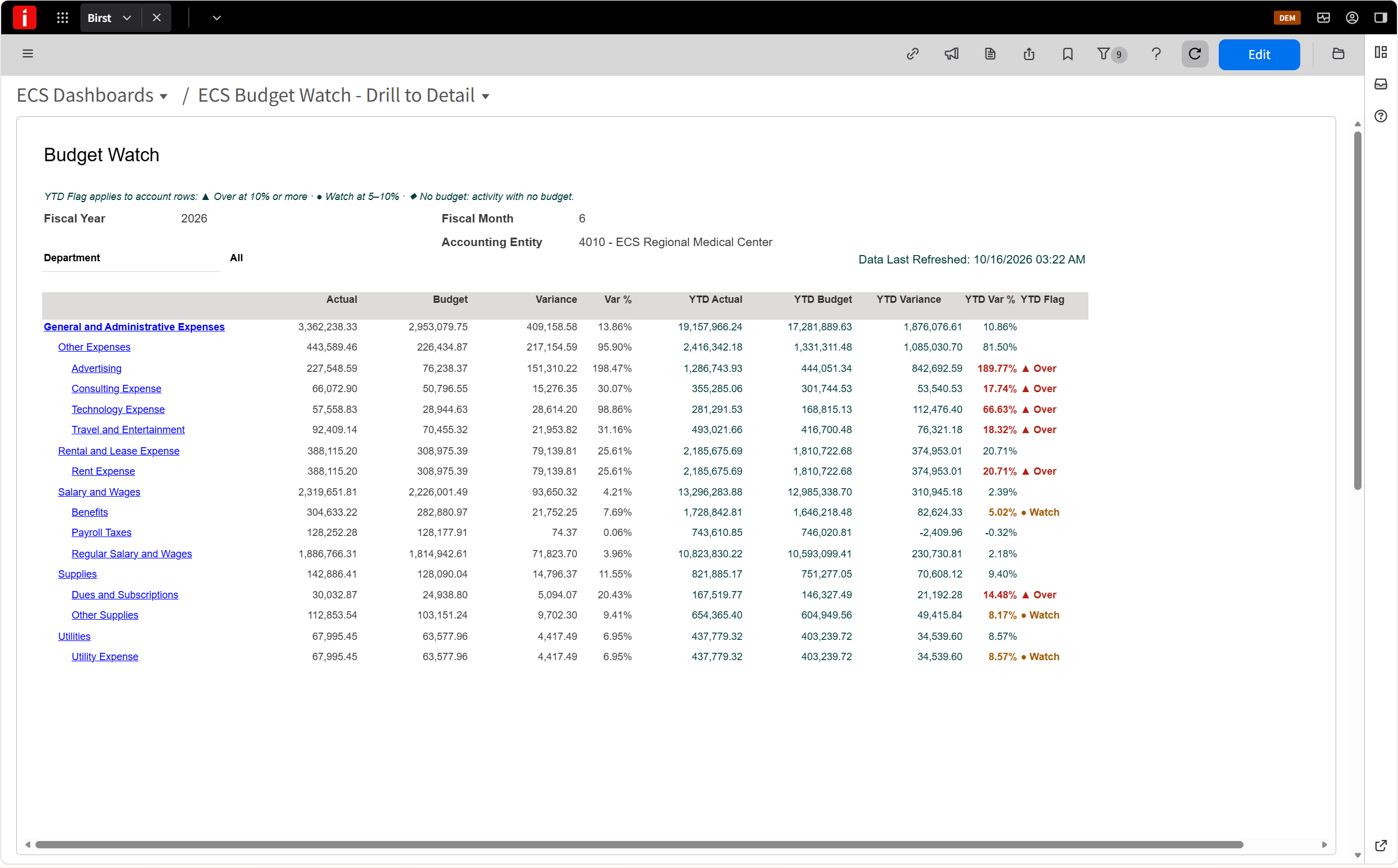
The delivered Birst Income Statement, made into a view each department manager can use: their own budget, overruns first, proven against your ledger.
WHAT YOUR TEAM DOES NEXT
Give each manager access to their department view; Finance answers only the exceptions.
HOW YOU'LL KNOW IT'S WORKING
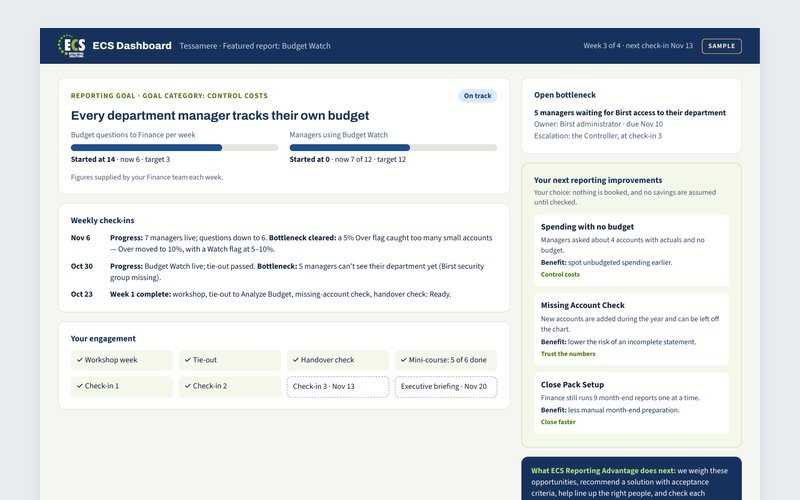
Budget questions to Finance each week; managers using Budget Watch.
GOAL CATEGORY: KEEP REPORTING RUNNING
The person who built our reports has left
START WITH A CALLSupports: Keep reporting running
Start: Report Handover
List the critical reports, write owner instructions for each, and train a backup through the ECS lessons.
WHAT YOUR TEAM DOES NEXT
Have a second team member run each critical report on their own.
HOW YOU'LL KNOW IT'S WORKING
Critical reports with a trained backup and current instructions.
Our conversion only covered some of our reports
START WITH A CALLSupports: Keep reporting running
Start: Conversion Gap Closure
Sort the reports you still rely on into mapped, adapted or rebuilt, work through them in your test environment, and prove each one against the original.
WHAT YOUR TEAM DOES NEXT
List the reports your team still runs from the old system, and name an owner for each.
HOW YOU'LL KNOW IT'S WORKING
Reports converted and proven; reports still rebuilt by hand.
Nobody owns our reporting backlog
REPORTING ADVANTAGESupports: Keep reporting running
Start: ECS Reporting Advantage
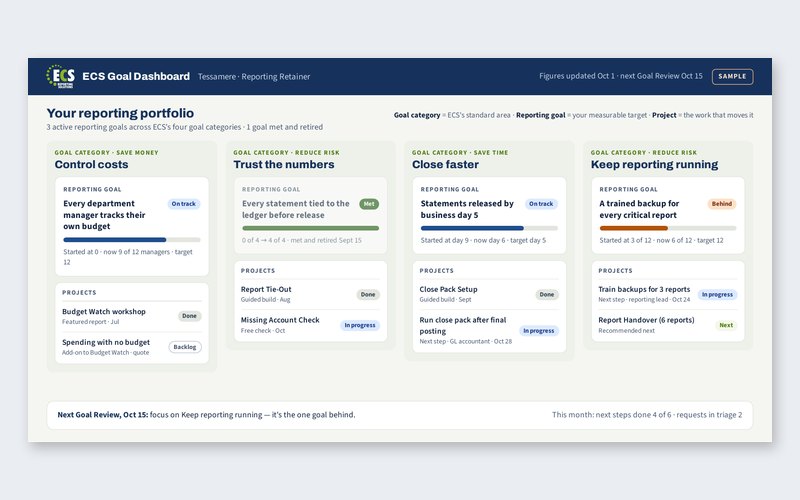
Set up to three reporting goals, track them on your goal dashboard, and get a Goal Review that assesses progress and plans the next step.
WHAT YOUR TEAM DOES NEXT
Link every backlog item to a goal and review the order monthly.
HOW YOU'LL KNOW IT'S WORKING
Progress on each reporting goal, reported quarterly.
MORE THAN ONE OF THESE?
Several of these apply
DIAGNOSTICSupports: Several goals at once
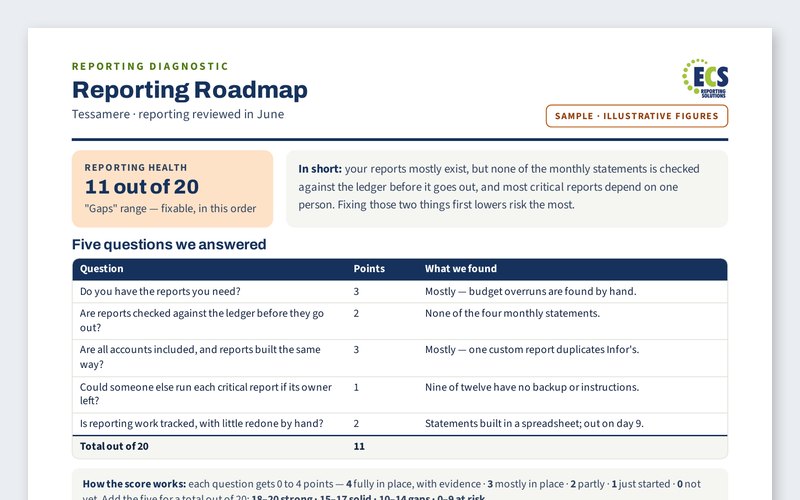
Start: Reporting Diagnostic
One review of everything at once, and a Reporting Roadmap that puts your problems in the right order — with the featured reports that fix each one.
WHAT YOUR TEAM DOES NEXT
Review the roadmap with your controller, then start with the top item.
HOW YOU'LL KNOW IT'S WORKING
Roadmap items completed; goals set with real baselines.
Not listed? Tell us the result you want. One focused need usually fits a featured report; several connected needs start with a Reporting Diagnostic. We confirm scope, data, responsibilities and a fixed fee before you commit.
FEATURED REPORTS
One delivered report, made better, every month.
Each month we add a report Infor already delivers to our library, and show your team how to make a few changes that save time and reduce risk. Fixed price. Live in a week. Proven against your ledger.
Save time
Less spreadsheet work, fewer questions to Finance.
Save money
Use what Infor already delivers instead of paying for custom builds.
Reduce risk
Numbers that tie, and no single point of failure.
FEATUREDNOVEMBERGoal category: Control costs
Budget Watch
Department managers track their own budgets — without contacting Finance.
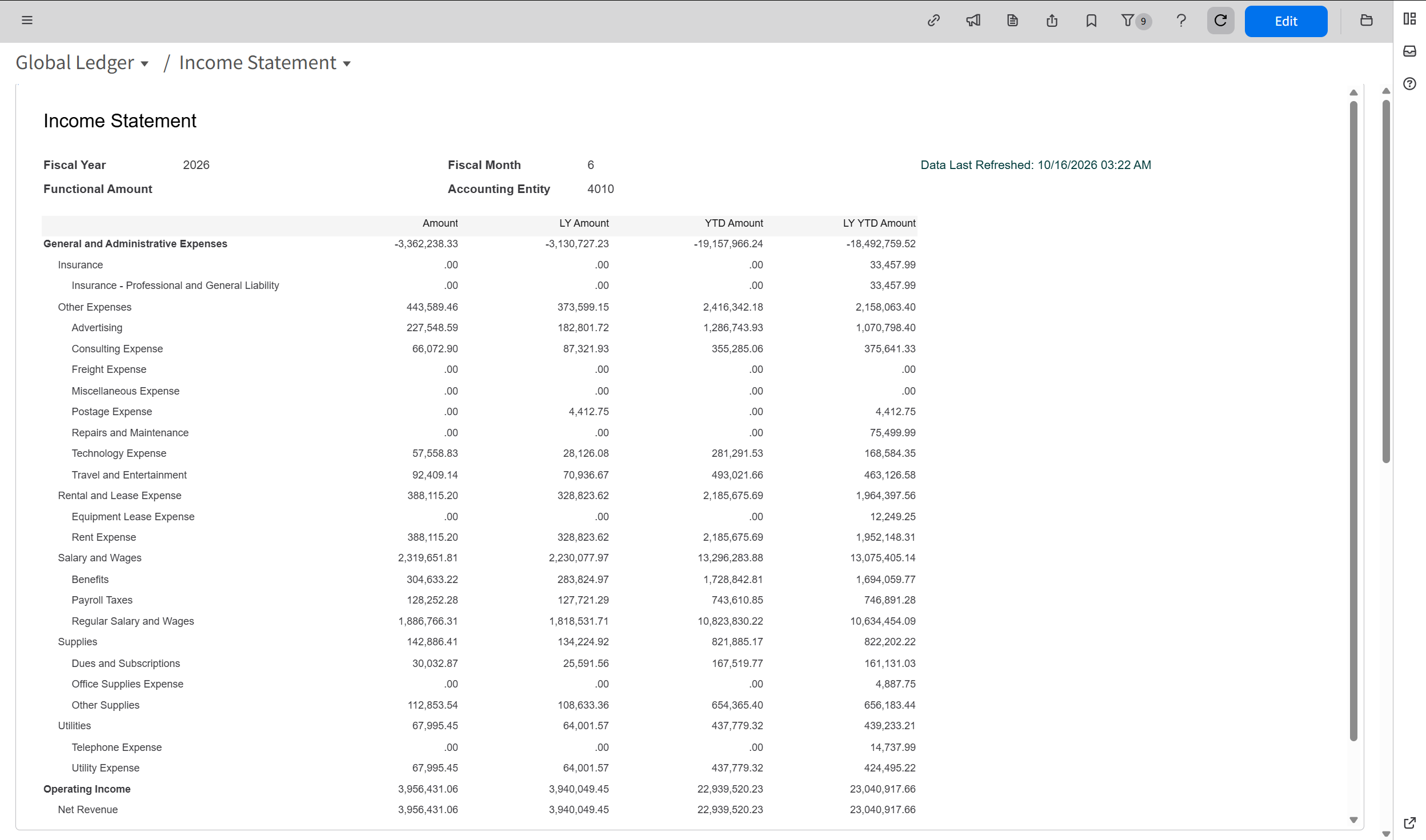
A hands-on workshop: your team turns the Birst Global Ledger Income Statement that Infor delivers into Budget Watch, with our guidance.
DESCRIPTION
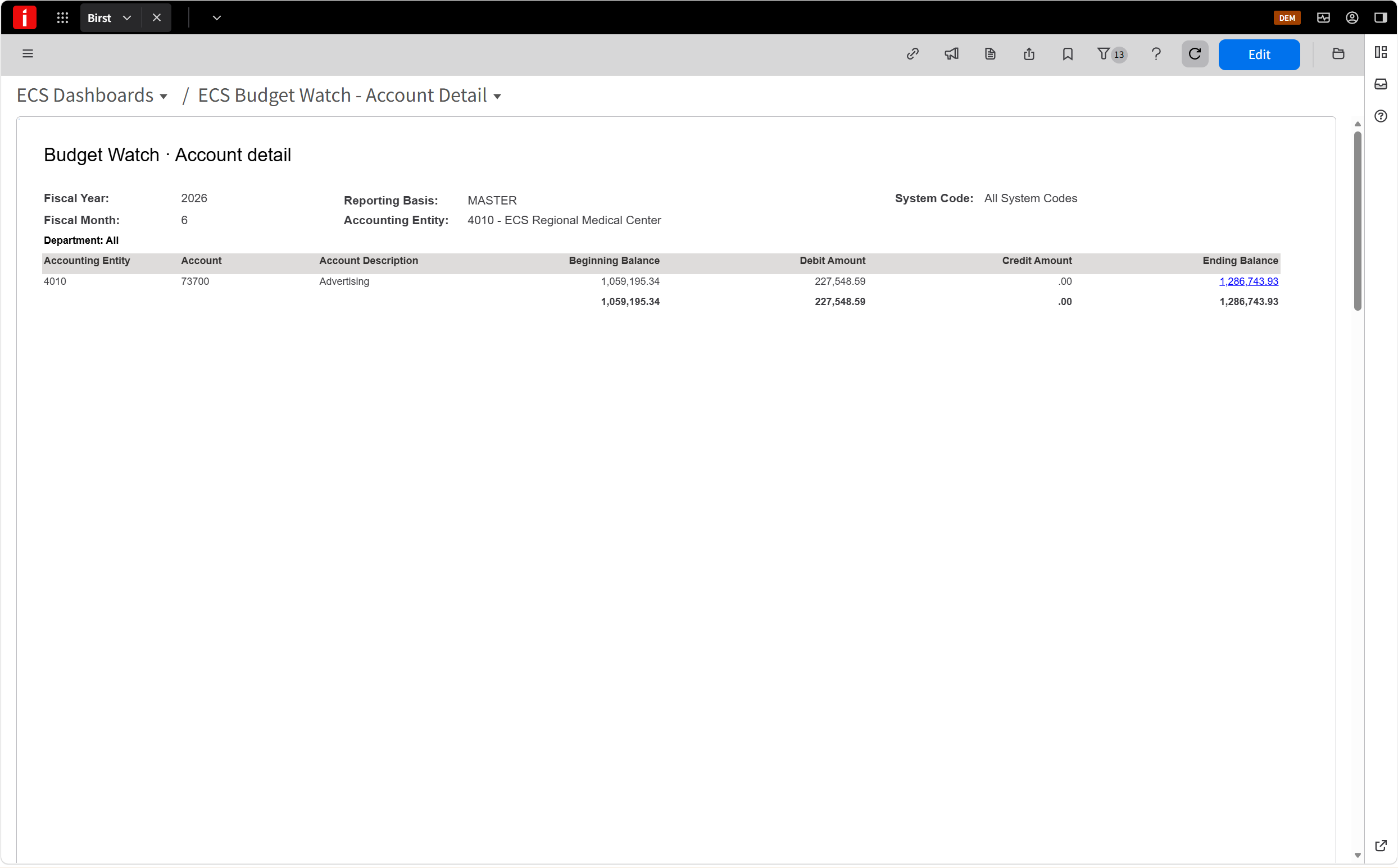
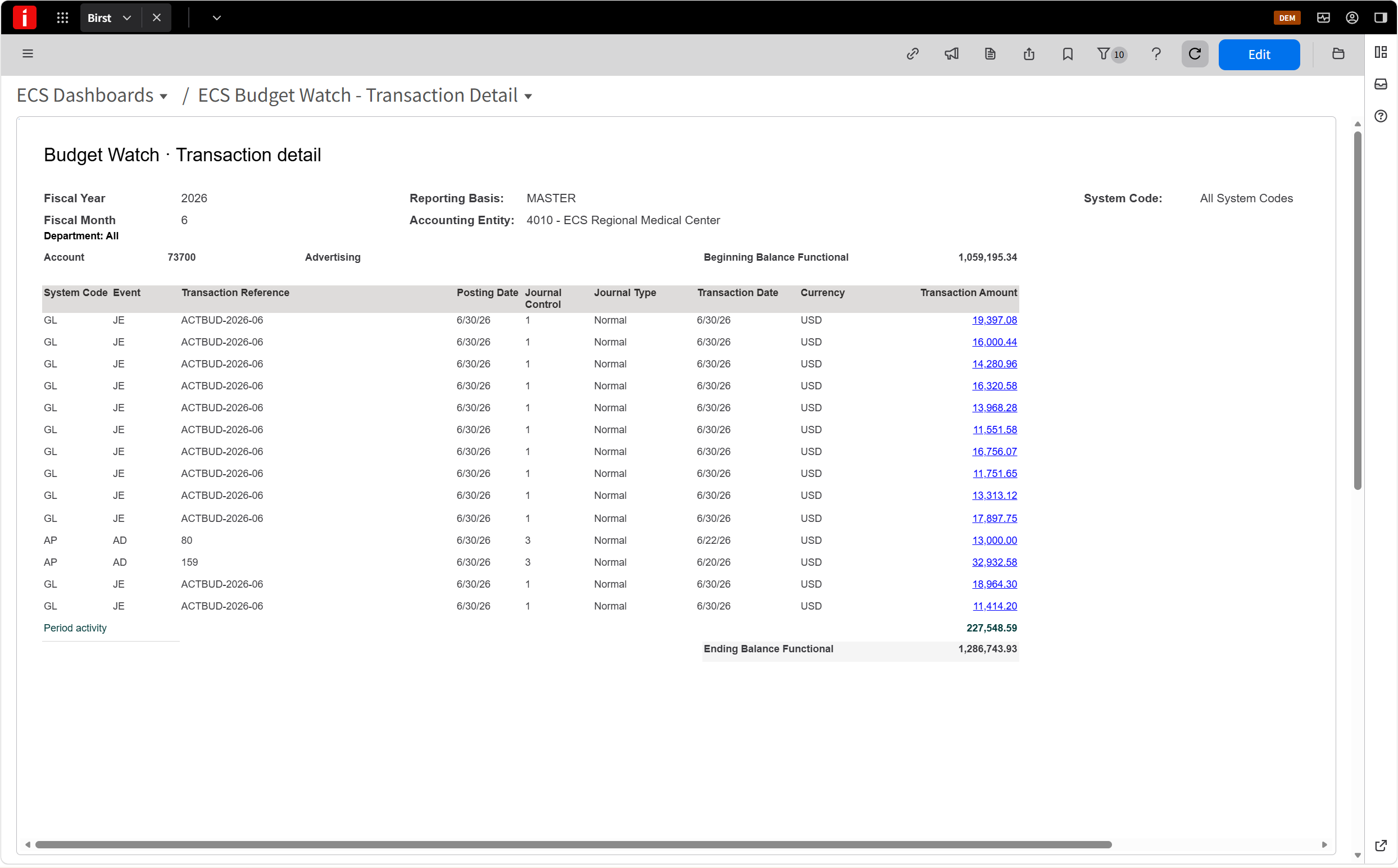
The delivered Income Statement already drills from account to transaction. In the workshop, your team turns it into a view each department manager can use: their own budget, with the overruns that matter first.
WHY IT MATTERS
When managers can't see their own budget, they ask Finance. Finance spends days each month answering those questions and building variance spreadsheets — and overruns still surface late.
FEATURES
- Largest overruns first
- Threshold flags you set
- Drill-down from department to account
- A view for each department manager
- Tied to your ledger before go-live
BENEFITS
- Managers check their budget any time — no call to Finance
- Finance gets hours back every month
- Overruns caught monthly, not at quarter-end
- Numbers managers trust, because they tie
BEFORE · THE DELIVERED INCOME STATEMENT
Built for Finance: every account, company-wide.
After: Facilities (cost center 1100), YTD
| Account | Budget | Actual | Variance | Flag |
|---|---|---|---|---|
| Salaries | 182,000 | 179,450 | 2,550 | — |
| Repairs & maintenance | 46,000 | 53,800 | (7,800) | ▲ Over |
| Utilities | 61,500 | 60,200 | 1,300 | — |
| Supplies | 18,000 | 12,900 | 5,100 | — |
Each department sees its own accounts: where it's over, where it has room.
What you get for $4,950
Fixed price · private to your team · up to 6 people
- ✓ Hands-on workshop: your team makes the changes
- ✓ Mini-course for your whole team, on demand
- ✓ Three live sessions, all in one week
- ✓ Step-by-step build guide for your team
- ✓ Three weekly check-ins after the workshop week
- ✓ Tie-out, handover check and your ECS dashboard
FEATURED REPORT CALENDAR
Nov 11 — AP to G/L tie-out
Nov 18 — Budget Watch
Nov 25 — October Infor release check
A new tested solution every Wednesday in Reporting Leaders, plus a featured report each month.
Join Reporting Leaders
A private community for Infor CloudSuite Financials reporting teams. One tested solution every Wednesday, starting November 11.
WHAT MAKES ECS DIFFERENT
Done means it ties, not that it was delivered.
| The typical approach | The ECS approach |
|---|---|
| Price on request | Fixed prices, published on this page |
| Build what was asked for | Start from what Infor already ships; build only the gap |
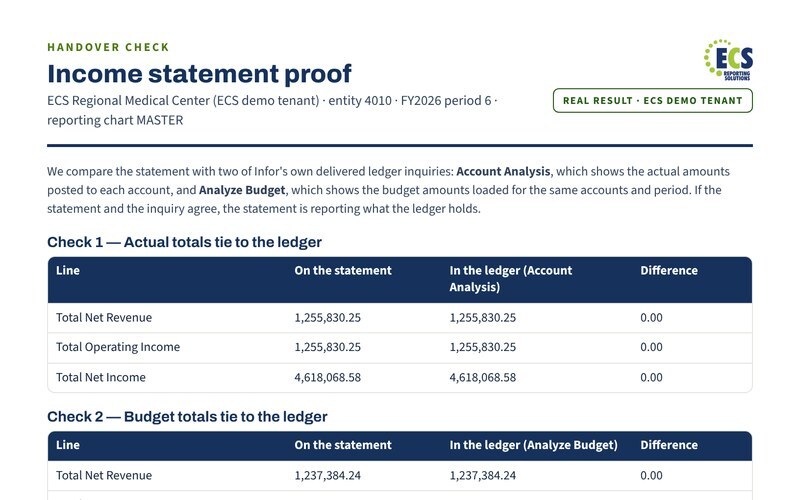
| Done when it's delivered | Done when it ties to your ledger, with the evidence file |
| The consultant keeps the know-how | Your team owns it: written runbook and a trained backup |
See a sample dashboard · See a sample goal scorecard · See a real handover check · See all samples →
TWO WAYS TO WORK WITH ECS
Start with one improvement. Keep going when there's more to do.
ONE FOCUSED IMPROVEMENT
A featured report
$4,950 · one week · private to your team, up to 6 people
- ✓ Hands-on workshop: your team makes the changes
- ✓ Mini-course for your whole team
- ✓ Three weekly check-ins after the workshop week
- ✓ Tie-out and handover check
- ✓ Your goal tracked on your ECS dashboard
ONGOING · RECOMMENDED AFTER A FEATURED REPORT
ECS Reporting Advantage
$5,000 for the first 30 days, then from $4,500 a month
- ✓ An ECS architect who knows your tenant
- ✓ Your reporting goals tracked on one dashboard
- ✓ The right fix, in the right order, each month
- ✓ Your reports proven against the ledger every month
- ✓ A quarterly scorecard for your CFO
FOR BIGGER REPORTING NEEDS
NOT SURE WHERE TO START?
Reporting Diagnostic
One review of everything at once, and a Reporting Roadmap that puts your problems in the right order.
$3,000 · The Diagnostic fee is credited toward your first 30 days of ECS Reporting Advantage if you start within 90 days.
FINANCIAL STATEMENTS
30-Day Statement Build
An income statement or balance sheet designed around your chart, built by your team, proven against your ledger.
From $9,950 · Guided Build · Specialist Build on request
FOR CLIENTS, PARTNERS AND RECRUITERS
Expert direction. The right people doing the work.
ECS works alongside your team, or with a delivery partner who supplies the analyst. Everyone knows their part from day one.
ECS: finds the cause, designs the fix, checks every result against your ledger, and signs off.
Your analyst or a partner's: makes the changes in test, investigates with your team, and writes the runbook.
Your Finance and IT owners: set the priorities, approve each change, and move it to production.
YOUR NEXT STEP
Tell us the result you want.
Bring a business goal, a featured report or your Pathfinder result. In 20 minutes we'll pick a useful first improvement, how you'll measure it and who will do the work.
What happens next
- A 20-minute call about your goal.
- A written proposal: deliverables, fixed fee, schedule.
- You accept, we confirm readiness and book your sessions.
ECS Reporting Solutions · Charlotte, North Carolina · contact@ecsreportingsolutions.com
About For partners & recruiters Private training Reporting Leaders community Privacy